Shot Scope LM1 vs Rapsodo MLM: Which Is Better? (October 2026)
Choose the Shot Scope LM1 for a built-in screen and range data without a phone, or the Rapsodo MLM for phone-based video and shot tracing. Your choice depends on which feedback you want during practice.
On this page (7 sections)
Choose the Shot Scope LM1 for a built-in screen and range data without a phone, or the Rapsodo MLM for video replay and shot tracing. In this Shot Scope LM1 vs Rapsodo MLM comparison, the key difference is how you want to see and use practice feedback.
The LM1 shows ball speed, club speed, smash factor, carry distance and total distance on its own screen. The MLM pairs with an iPhone or iPad and adds launch angle, shot shape, video replay and a shot tracer.
Both suit golfers comparing shots during practice. We compared their stated features and setup needs to match each monitor to a different routine.

Shot Scope LM1 vs Rapsodo MLM: what is the main difference?
The LM1 has its own screen, while the MLM uses an iPhone or iPad app. That choice affects what you see during each shot and how you review a session later.
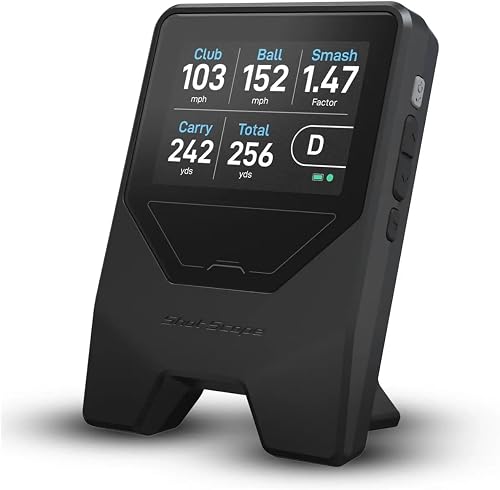
The LM1 has a 3.5-inch color screen, so you can read its data at the unit without bringing a phone or tablet. The Rapsodo MLM uses its app to pair shot information with video and a GPS satellite view.
Choose based on the feedback you want to use. A phone-free setup suits you if you mainly need speed and distance numbers; video can help if you want to review a swing alongside its traced ball flight.
Which monitor shows the shot data you need?
The Rapsodo MLM provides launch angle and shot shape, while the Shot Scope LM1 includes smash factor and total distance. Which set of metrics fits better depends on what you plan to work on.
The LM1 measures ball speed, club speed, smash factor, carry distance and total distance. It does not display spin, so golfers who need spin figures should consider other options.
The Rapsodo MLM provides ball speed, club speed, launch angle, carry distance and shot shape. Its video replay and tracer show a visual record of the swing and ball flight.
What numbers does the Shot Scope LM1 show?
The LM1 gives you speed, distance and strike-efficiency figures in real time. Its screen lets you read those numbers without switching between a hitting spot and a phone.
Smash factor compares ball speed with club speed. Use it as one piece of practice feedback, rather than a full description of your swing or the shot's result.
The LM1 has selectable On-Course, Practice Range and Speed Training sessions. Its speed mode works with clubs and speed sticks.
What data and video does the Rapsodo MLM provide?
The MLM combines shot metrics with video replay and shot tracing. This can suit golfers who want to connect a number with a view of the swing and ball flight.
Its shot-shape data and GPS satellite view also let you review dispersion and performance trends. Those views rely on the iPhone or iPad app, so check that you have a compatible device before choosing it.
For a wider overview of how different monitors capture ball data, see our guide to camera-based launch monitors. The launch monitor comparison chart can also help you compare these options with other models.
Which is easier to set up at the range?
The LM1 uses a standalone setup, while the MLM requires an iPhone or iPad and its app. Both are portable choices, but your phone routine can shape how easy each feels to use.
For the LM1, select a session type and place the unit about a driver's length behind the ball. It displays data in real time without calibration or setting changes.
The MLM pairs with an iPhone or iPad through Bluetooth and uses the device's camera with radar tracking. That gives it a video-based workflow, but your phone or tablet needs to be available during practice.
If you are comparing phone compatibility across the category, our guide to launch monitors for iPhone and Android explains why device support matters before you buy.
Can the LM1 work without a phone?
Yes. You can view LM1 shot data on the monitor itself, which is useful if you want to keep your phone away while hitting.
The free Shot Scope app adds session history, including lifetime records without a subscription. You can decide whether that follow-up view is useful after a practice session.
Does the Rapsodo MLM need an iPhone or iPad?
Yes. The Rapsodo MLM is built for iPhone and iPad, and its app provides video replay, shot tracing and GPS views.
That phone dependency is a poor fit if you use Android or prefer not to set up a device at the range. If you already bring an iPhone or iPad, the app can provide the MLM's visual feedback.
Which is better for speed training?
The Shot Scope LM1 has a dedicated speed training mode for clubs and speed sticks. The PRGR HS 130-A is another option if measuring club head speed without a ball is central to your routine.
The LM1 also has Practice Range and On-Course sessions, so you can use the same unit for different types of practice. Its Speed Training mode works with both clubs and speed sticks.
The PRGR HS 130-A measures club head speed with or without a ball and does not require an app. See our PRGR HS 130-A vs Shot Scope LM1 comparison if speed training is your main reason for buying.
Which one suits indoor or outdoor practice?
The Rapsodo MLM is described for use at a driving range, backyard or indoor net, while the LM1 is suitable for indoor or outdoor range use and on-course sessions. Consider the practice space you plan to use.
Shot Scope describes the LM1 as IPX3 rated and rain-ready. Check its care guidance before using it in wet conditions.
The Rapsodo MLM's camera and radar setup can work around an indoor net or outdoors. Allow space for the phone camera and the unit, and follow the setup guidance for your practice environment.
For net sessions, read our guide on using a launch monitor when hitting into a net. It covers setup questions that can affect a camera and radar system indoors.
What do you get beyond the first session?
The LM1 includes a free app with lifetime session history and no subscription fees, while the MLM offers app-based video and simulator features, with Premium required for simulator courses and game modes. Think about whether you are more likely to review your swing or track session numbers.
The LM1 includes a free Golf GPS app and lifetime session history, with no subscription fees required for those features. Its battery lasts more than 5 hours and it charges over USB-C.
The MLM app provides video replay, shot tracer, GPS satellite view and performance trends. Premium provides simulator courses and game modes, so consider those separately from the core shot feedback.
Our guide to launch monitor subscriptions explains how to check which features are included and which require paid access across other models.
Which monitor should you choose?
Pick the Rapsodo MLM if you want phone-based video, shot shape and a shot tracer; pick the Shot Scope LM1 if you want screen-based data, smash factor, total distance and speed training. Your device preference is the simplest tiebreaker.
The LM1 fits golfers who want to see core numbers without opening an app and want a dedicated speed training option. Its free app provides lifetime session history for later review.
The MLM fits golfers with an iPhone or iPad who will use video and the tracer during practice. It also reports launch angle and shot shape, while simulator courses and game modes require Premium.
For a detailed look at the LM1's screen, sessions and measurements, read our Shot Scope LM1 review. If you want to compare other portable choices, our guide to portable golf launch monitors is a useful next step.
Frequently asked questions
Is the Shot Scope LM1 better than the Rapsodo MLM?
The Shot Scope LM1 suits you if you want a built-in screen and range data without a phone. The Rapsodo MLM suits you if video replay, shot tracing, launch angle and shot shape matter more.
Choose based on the feedback you'll use during practice.
Does the Shot Scope LM1 need a phone?
No, you can view the LM1's range data on its 3.5-inch color screen without a phone or tablet. The free Shot Scope app provides session history, including lifetime records without a subscription.
Does the Rapsodo MLM work with Android?
The Rapsodo MLM pairs with an iPhone or iPad running iOS. Its phone-based setup is central to the experience, so Android users may prefer another option, such as the Shot Scope LM1, which displays range data on its own screen.
Which monitor shows more shot data?
The Rapsodo MLM adds launch angle and shot shape to ball speed, club speed and carry distance. The Shot Scope LM1 shows smash factor and total distance along with ball speed, club speed and carry distance; it does not display spin.
Can you use the Rapsodo MLM as a golf simulator?
The Rapsodo MLM offers simulator courses and game modes through Premium. The Shot Scope LM1 has On-Course, Practice Range and Speed Training sessions, with data on its screen and session history in the free app.