9 Best Portable Golf Launch Monitors for the Range (October 2026)
The best portable golf launch monitors include the Garmin Approach R10 for app-based range practice, the PRGR HS 130-A for app-free speed training, and the Shot Scope LM1 for screen-first range sessions.
On this page (4 sections)
The Garmin Approach R10 is the best portable launch monitor for most range golfers, pairing shot metrics with swing video and a phone-based dispersion chart. For a simpler tool, the PRGR HS 130-A measures club speed without a ball and needs no app.
A portable unit brings feedback to the range, but the right pick depends on what you want to see between shots. Some put the numbers on a built-in screen, while others rely on a phone app for charts, video or simulator features.
If you're weighing radar against camera-based models, start with our guide to golf launch monitor types and how to pick. This roundup covers portable choices for range practice, from basic speed feedback to app-based analysis.
Our picks at a glance
-
1

-
2

-
3
How we chose the best portable launch monitors
The best portable launch monitor should fit your range routine, show useful information clearly and make setup manageable. We compared the stated metrics, feedback method, battery details, training modes, app requirements and included practice features.
A built-in display can be convenient if you want a quick glance between shots. App-connected models can add charts, video or simulator play, but those features may depend on a compatible phone, a subscription or a particular operating system.
Scores reflect how well each feature set fits portable range practice, along with the stated specs and available buyer feedback. Our score weighs specs, features and buyer feedback against what you're shopping for.
| Product | Best for | Battery | Display | App | Our score |
|---|---|---|---|---|---|
| Garmin Approach R10 | app-based range practice | Up to 10 hours | Compatible smartphone | Garmin Golf | 9.2 |
| PRGR HS 130-A | app-free speed training | 8.7 | |||
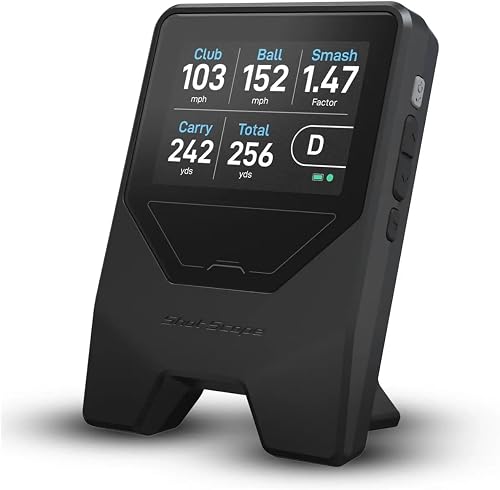
| Shot Scope LM1 | screen-first range sessions | 5+ hours | 3.5-inch color screen | Free Golf GPS app, no subscription required | 8.4 |
| Voice Caddie SC200 Plus | spoken shot feedback | 8.2 | |||
| Voice Caddie SC4 Pro | a built-in screen and simulator modes | Built-in screen and voice output | 8.1 | ||
| TheStack Radar | speed and wedge practice | 7.9 | |||
| FlightScope Mevo Gen2 | data-rich practice and video | Up to 6 hours | 7.8 | ||
| Blue Tees Rainmaker | a large screen and standalone modes | Over 6 hours | 4.3-inch TFT | 7.5 | |
| Izzo Swami Launch Master Pro | a broad stated distance range | 7.4 |
Portable launch monitors for different range routines
The Garmin Approach R10 leads this group because it combines range metrics, club-by-club training stats, video clips and up to 10 hours of battery life. The picks below follow in score order, with each suited to a different practice style.
Garmin Approach R10: Best for app-based range practice
- Up to 10 hours battery life
- Garmin Golf app metrics and dispersion chart
- Automatic swing video clips
- Virtual rounds require an active subscription
The R10 combines range metrics with phone video and a shot dispersion chart. Its phone mount and carry case support moving between practice locations.
Pros
- Long stated battery life
- Video clips with swing metrics
- Training mode tracks stats by club
Cons
- Requires a compatible smartphone for app features
- Virtual rounds require an active subscription
The Garmin Approach R10 is the most versatile pick here for golfers who want more than a speed number after each shot. Paired with a compatible smartphone and Garmin Golf app, it tracks club head speed, ball speed, swing tempo, ball spin, launch angle and more.
Training mode records stats for each club and shows a shot dispersion chart based on estimated ball flight. The app can also record swing clips with that swing's metrics, giving you a way to review the motion and numbers after practice.
Garmin includes a phone mount that attaches to a golf bag, a carry case and a tripod stand. Battery life is up to 10 hours, so this option suits longer sessions or golfers who want to use it at home as well as at the range.
The phone provides the app experience. Virtual rounds on more than 42,000 courses and weekly tournaments require an active subscription.
Choose the R10 if you want app-based shot analysis and video in one portable setup. For a screen-first option, compare it with the built-in screen versus phone app launch monitor guide.
PRGR HS 130-A: Best for app-free speed training
- Measures club speed with or without a ball
- No app, Wi-Fi or Bluetooth required
- Stores 500 past swings
- Uses AAA batteries
The PRGR focuses on club and ball speed, smash factor, and carry and total distance. Its no-app operation and no-ball speed mode suit straightforward practice.
Pros
- Speed training without a ball
- No phone setup
- Stores 500 swings
Cons
- No app-based shot history
- Metric range is narrower than simulator-oriented picks
The PRGR HS 130-A is a simple choice for golfers who want speed feedback without phone setup. It measures club head speed with or without a ball, plus ball speed, smash factor, carry distance and total distance.
That makes it useful for speed training sessions where hitting a ball every time isn't part of the plan. PRGR says the device stores 500 past swings, and it runs on AAA batteries without Wi-Fi, Bluetooth or an app.
The pocket-sized format is easy to pack with other range gear. It focuses on speed and distance measures rather than the app charts, swing video or simulator features found in some higher-ranked choices here.
Pick the PRGR for quick speed work with no app. If you want a broader overview of budget options, see our guide to best budget golf launch monitors.
Shot Scope LM1: Best for screen-first range sessions
- 3.5-inch color screen
- Ball and club speed, smash factor and distances
- 5+ hours battery life
- Free app with lifetime session history
The LM1 displays key shot numbers on its own screen and can sync session history to the Shot Scope app. Its selectable range and speed-training modes cover two common practice needs.
Pros
- On-device display
- Free app and lifetime session history
- No calibration needed
Cons
- Does not display spin
- Battery life is shorter than the top pick
The Shot Scope LM1 is a good fit if you want a device screen for quick checks and an app for reviewing sessions later. Its 3.5-inch color screen shows ball speed, club speed, smash factor, carry distance and total distance in real time.
It has selectable On-Course, Practice Range and Speed Training session types, so you can set the session to match what you're doing. Shot Scope says it takes no calibration and can sit around a driver's length behind the ball.
The free Golf GPS app includes lifetime session history with no subscription fee, and the battery lasts 5+ hours on one charge. The LM1 does not display spin, so it suits distance and speed feedback better than detailed ball-flight analysis.
Choose the LM1 if you prefer on-device numbers and simple session history. Our Shot Scope LM1 review covers its strengths and limits in more detail.
Voice Caddie SC200 Plus: Best for spoken shot feedback

- LCD display and voice output
- Swing speed mode without a ball
- Stores shot data and club statistics
The SC200 Plus pairs an LCD with voice output, so you can hear shot data as you practice. It also offers no-ball swing speed mode and stores shot data and club statistics.
Pros
- Voice output
- No-ball speed practice
- Stores club statistics
Cons
- App features are not specified
- Detailed metric list is not specified
The Voice Caddie SC200 Plus suits golfers who want shot feedback without keeping their eyes on a phone. Its LCD display and voice output provide real-time data, while stored shot data and club statistics let you return to average distances later.
A swing speed mode works without a ball, which adds a training use beyond normal range shots. The device also has adjustable loft angles for simulating different club conditions.
Battery life and the full metric list aren't specified here. If exact numbers such as spin or launch angle matter to you, check that the model tracks them before choosing it.
Pick the SC200 Plus if voice output and no-ball speed practice are your priorities. For an at-a-glance screen comparison, read built-in screen versus phone app launch monitors.
Voice Caddie SC4 Pro: Best for a built-in screen and simulator modes

- Built-in screen with voice output
- Practice, target, speed and simulator modes
- 3D Driving Range and E6 Connect included
- No special balls required
The SC4 Pro combines a built-in screen and voice output with practice and simulator modes. Its app adds statistical analysis and distance calibration.
Pros
- Built-in screen
- Multiple training modes
- Includes 3D Driving Range and E6 Connect
Cons
- Advanced app features require a phone
- Battery life is not specified
The Voice Caddie SC4 Pro combines a built-in screen and voice output with several ways to practice. Its modes include a 3D simulator, practice or target mode, and speed training.
The SC4 Pro includes a 3D Driving Range and E6 Connect access, and the VOICECADDIE S app adds statistical analysis, distance calibration and swing-speed radar features. It uses standard golf balls, so specially marked balls aren't required.
This suits golfers who want screen-based feedback and simulator play. Advanced app features depend on a phone, and battery life isn't specified.
Choose the SC4 Pro if you want built-in feedback plus simulator modes. See our Garmin R10 versus Voice Caddie SC4 Pro comparison if you are deciding between app features and a built-in screen.
TheStack Radar: Best for speed and wedge practice

- Measures swing and ball speed
- Estimates carry distance and smash factor
- Connects to TheStack app by Bluetooth
- Wedging app is iOS only
TheStack Radar centers on speed training and wedge practice, sending training speeds to TheStack app. Wedging features are iOS only, so check device support before choosing it.
Pros
- Speed data transfers to the app
- Wedge practice sessions available
- Supports Android speed training
Cons
- Wedging is not available on Android
- Battery life is not specified
TheStack Radar is aimed at speed and wedge practice. It measures swing speed and ball speed, then estimates carry distance and smash factor.
It connects to TheStack app by Bluetooth and sends training speeds to your phone. The included wedging app offers skill-focused practice sessions, and a one-month free trial of Stack Wedge Mode is included.
Check device support before choosing it. Speed training supports Apple and Android devices, but wedging is only available on iOS.
Pick TheStack Radar if your range sessions center on speed work or wedge distance practice. If a simpler app-free speed tool sounds better, compare it with the PRGR HS 130-A versus Shot Scope LM1 guide.
FlightScope Mevo Gen2: Best for data-rich practice and video

- 18 swing data parameters
- Front-facing camera and video overlays
- Up to 6 hours battery life
- Includes 8 E6 Connect courses
Mevo Gen2 brings a wide data set, shot tracer and recorded swing video into range practice. It also includes an E6 Connect bundle with 8 courses and says there are no subscription fees.
Pros
- 18 stated data parameters
- Video with shot data overlays
- Includes 8 E6 courses
Cons
- Shorter stated battery life than several picks
- Phone or tablet use is part of the app workflow
The FlightScope Mevo Gen2 suits golfers who want a larger practice data set and recorded video. It offers 18 swing data parameters, a front-facing camera and video with shot data overlays.
The FS Golf software records, clips and saves video, and the unit can connect with up to three mobile devices in addition to its internal camera. The bundle includes E6 Connect with 8 courses, FS Golf, FS Skills and Shot Tracer, with no annual license fees.
The range ball setting is designed to provide more accurate data when using range balls. Battery life is up to 6 hours, so plan charging around longer days.
Choose Mevo Gen2 if data, video and range-ball practice matter more than battery runtime. For a home simulator comparison, see Garmin R10 versus FlightScope Mevo Gen 2.
Blue Tees Rainmaker: Best for a large screen and standalone modes

- 4.3-inch display
- Standalone practice, target and swing speed modes
- Over 6 hours battery life
- 12-month premium app access included
Rainmaker has a wide display and can run practice, target distance and swing speed modes without a phone connection. Its included premium app access lasts 12 months.
Pros
- Large built-in display
- Standalone training modes
- Carrying case and USB-C charging included
Cons
- Included premium app access is limited to 12 months
- Long-term subscription terms need checking
The Blue Tees Rainmaker is a screen-first option with standalone modes for practice, target distance and swing speed. Its 4.3-inch display and battery runtime of over 6 hours are stated features.
Rainmaker measures more than 20 ball and club metrics, including ball speed, club speed, carry distance, launch angle, spin rate and smash factor. It also supports E6 Connect and GSPro, while the included premium app package provides 12 months of access.
The app package includes 3D range simulation and additional performance metrics. Premium app access is time-limited, so check ongoing membership terms if you expect to keep using those features after the first year.
Choose Rainmaker if you want a large display and range modes that can work without a phone. Compare app requirements with our guide to launch monitors for iPhone and Android.
Izzo Swami Launch Master Pro: Best for a broad stated distance range

- Measures carry and total distance, speed, launch and spin metrics
- Stated range of 30–420 yards
- Custom club and loft settings
- Integrated weather sensors
The Swami Launch Master Pro offers a wide range of swing and ball-flight measures, with club and loft settings and weather sensors. Its stated distance range extends from short shots to long drives.
Pros
- Broad stated measurement range
- Weather sensors
- Hard-shell carry case included
Cons
- Battery life is not specified
- App or simulator support is not specified
The Izzo Swami Launch Master Pro measures carry and total distance, swing speed, ball speed, smash factor, launch angle, attack angle, spin rate and apex. It also lets you select club types and loft angles.
Its stated measuring range is 30 to 420 yards, spanning short shots through long drives. Integrated weather sensors factor in temperature, humidity and altitude, and a hard-shell carry case is included.
Battery runtime, a companion app and simulator support aren't specified. This suits golfers who value its listed measures and range over phone-based analysis or virtual golf.
Pick the Izzo if you want many stated metrics and customizable club settings. For a wider overview of choices by budget, see our guide to best golf launch monitors under 1,000 dollars.
How to choose a portable launch monitor for the range
Choose a portable launch monitor by deciding what you want to learn from each shot, then match its display, app and battery setup to your range routine. A high metric count is useful only if you understand the numbers and can act on them.
Which metrics matter in a portable launch monitor?
For distance control, start with carry distance and club-by-club averages. For speed training, look for club speed with or without a ball, while golfers checking contact efficiency may want smash factor.
Spin, launch angle and shot dispersion add context to ball flight, but these measures aren't available across every unit. If they matter to you, confirm that your preferred model displays them.
Is a built-in screen or phone app better at the range?
A built-in screen is convenient when you want a quick number without opening an app. The LM1, SC4 Pro and Rainmaker include screens, while Garmin and Mevo Gen2 use phone apps for charts, video and other connected features.
Phone-based tools can add detail, but setup depends on a compatible device and enough battery for the full session. The PRGR is a simple option if you want to skip wireless connections.
How much battery life do you need?
A short bucket may not need a long battery rating, while a full practice day makes charging more important. The Garmin Approach R10 offers up to 10 hours, the Mevo Gen2 up to 6 hours, and the LM1 5+ hours.
Battery use can vary with features such as video, screen brightness and wireless connections. If you record swing clips, leave room for that use in your charging plan.
Should you choose an app-connected monitor?
An app can help organize practice with charts, saved sessions, swing video or virtual play. The Garmin Golf app supports video clips and dispersion charts, while Shot Scope's app stores session history without a subscription fee.
Before choosing, check the phone system supported and which features require a paid membership. The launch monitor subscription comparison explains app costs that can affect long-term use.
Which portable golf launch monitor should you buy?
The Garmin Approach R10 is the most balanced choice if you want range metrics, shot dispersion and swing video from one portable unit. Choose the PRGR HS 130-A for app-free speed practice, the Shot Scope LM1 for its built-in screen and free session history, or Mevo Gen2 for more data and video.
Choose the best portable launch monitor whose feedback matches your next practice goal. For broader model types and selection advice, continue with our golf launch monitor guide or browse the best golf launch monitors.
Our top 3 picks at a glance
-
1
-
2
-
3
Frequently asked questions
What is the best portable launch monitor for range practice?
The Garmin Approach R10 is a strong all-around choice for range practice if you want phone-based metrics, video clips and a shot dispersion chart. The PRGR HS 130-A is simpler for speed work because it needs no app and can measure club speed without a ball.
Choose by the feedback you will use during practice.
Do portable golf launch monitors need a phone?
Some do, while others show basic data on the device. Garmin pairs with a compatible smartphone for its app metrics and swing video, while the Shot Scope LM1 has its own screen and can sync session history to its app.
The PRGR works without an app, Wi-Fi or Bluetooth.
Which portable launch monitors work for swing speed training?
The PRGR HS 130-A and Voice Caddie SC200 Plus both include swing speed training without a ball. The Shot Scope LM1, SC4 Pro, TheStack Radar and Blue Tees Rainmaker also describe speed-training modes.
Check whether the mode fits your practice routine and phone setup.
Can a portable launch monitor work indoors and at the range?
Several picks describe indoor and outdoor use, including the Garmin Approach R10, SC4 Pro, Mevo Gen2 and Rainmaker. Indoor use depends on following setup guidance and leaving enough room for the device and ball flight or net.
For net practice, see our launch monitor guide for hitting into a net.
Do launch monitors need a subscription?
Subscription needs depend on the features you want. Garmin requires an active subscription for its virtual rounds, while the Shot Scope LM1 includes a free app with lifetime session history and the Mevo Gen2 includes an E6 bundle with no annual license fees.
Compare app terms before you choose.