Garmin R10 vs Voice Caddie SC4 Pro: Which Is Better? (October 2026)
Choose the Garmin R10 for app-based swing analysis and recorded video; choose the Voice Caddie SC4 Pro for a built-in screen and voice output. Your preferred display and simulator setup are the clearest differences between these launch monitors.
On this page (7 sections)
- Garmin R10 vs Voice Caddie SC4 Pro: what is the main difference?
- Which one is better for reviewing your swing?
- How do their simulator features compare?
- Which monitor fits a driving range routine?
- What balls and practice spaces do they support?
- Where does the Rapsodo MLM2PRO fit?
- Which should you choose: Garmin R10 or SC4 Pro?
Choose the Garmin R10 for app-based swing analysis and recorded video; choose the Voice Caddie SC4 Pro for a built-in screen and voice output. The Garmin R10 vs Voice Caddie SC4 Pro choice comes down to how you want to view practice data and which simulator features fit your routine.
The R10 pairs with a compatible smartphone and Garmin Golf app to show metrics, shot dispersion and automatic swing video clips. The SC4 Pro has a built-in screen, voice output, several training modes and access to a 3D Driving Range and E6 Connect.
Garmin R10 vs Voice Caddie SC4 Pro: what is the main difference?
The R10 centers practice around the Garmin Golf app, while the SC4 Pro gives you a built-in screen and voice output. That difference can shape every range session, even before you compare metrics or simulator features.
With the R10, a compatible smartphone connects to the Garmin Golf app. The app can show club head speed, ball speed, swing tempo, ball spin, launch angle and other metrics, and it can record video clips with the swing metrics.
The SC4 Pro combines its built-in display with voice output. It also offers practice or target mode, speed training and a 3D simulator mode.
If you prefer checking a phone during practice, the R10's app approach may feel natural. If you want the monitor itself to display information, consider the SC4 Pro.
Our guide to built-in-screen versus phone-app launch monitors explains the trade-offs.
Which one is better for reviewing your swing?
The R10 is the clearer fit if you want automatically recorded swing video linked with shot metrics. The SC4 Pro offers app-based statistical analysis, but its features don't describe the same automatic video workflow.
Garmin says that, when paired with a compatible smartphone and Garmin Golf app, the R10 can automatically record video clips that include the metrics for that swing. Its training mode also tracks stats by club and shows a shot dispersion chart based on estimated ball flight.
The SC4 Pro connects to the VOICECADDIE S app for statistical analysis and features such as distance calibration and swing speed radar. Those tools support practice review, but automatic video clips aren't specified.
For a closer look at the R10's app, see what the Garmin Golf app does with the R10. If you want a broader explanation of the numbers these devices show, read golf launch monitor numbers explained.
How do their simulator features compare?
Both offer virtual practice options, but Garmin ties its virtual rounds to an active subscription while the SC4 Pro includes access to a 3D Driving Range and E6 Connect. Confirm the current software requirements before building a home setup around either one.
Garmin offers virtual rounds on over 42,000 courses and weekly tournaments through Garmin Golf with an active subscription. Course access requires that subscription.
The SC4 Pro includes access to a 3D Driving Range and E6 Connect. It also has a 3D simulator mode, plus practice or target mode and speed training.
For a home simulator, consider the screen, hitting area, device placement and the services you want to use. Our guide to launch monitors for a home golf simulator covers the rest of that setup.
What should you check before choosing a simulator?
Check the exact app, subscription and connection needs for the games you plan to play. A large course count matters only if the courses work with your preferred setup and the ongoing terms suit you.
The R10's course play and weekly tournaments require an active subscription. The SC4 Pro includes access to E6 Connect, but the product information doesn't specify every current plan term or supported configuration, so check the service details before buying.
If you already use a simulator program, confirm that it supports your chosen monitor and device. The launch monitor subscription comparison can help you spot ongoing costs and feature limits.
Which monitor fits a driving range routine?
The R10's stated battery life of up to 10 hours may suit longer sessions, while the SC4 Pro brings a built-in screen and voice output to practice. Choose based on how you prefer to get feedback between shots.
Garmin gives the R10 up to 10 hours of battery life. It includes a phone mount that attaches to a golf bag, which can make it easier to view and interact with the app during practice.
The SC4 Pro's screen and voice output offer a different way to check information. Its speed-training mode can also support sessions focused on swing speed rather than a full simulated round.
Both are described for indoor and outdoor use. For other portable options and what to consider at the range, see best portable golf launch monitors.
What balls and practice spaces do they support?
The SC4 Pro is specified for standard golf balls, while the R10's features don't state a special-ball requirement. Match the monitor to the space and ball setup you can use consistently.
Voice Caddie says the SC4 Pro needs no specially marked balls for indoor or outdoor practice. That can simplify setup if you want to use the balls you already have.
For either monitor, allow enough room to swing safely and follow the brand's setup instructions. Indoor use also depends on a suitable net or screen, a stable hitting surface and room behind or beside the ball for the monitor.
If you plan to hit into a net, our guide on using a launch monitor with a net covers practical setup questions. You can also compare golf simulator hitting mats if the hitting surface is part of your decision.
Where does the Rapsodo MLM2PRO fit?
Consider the Rapsodo MLM2PRO if you want radar and dual-camera capture with 15 metrics. It adds a third option for golfers prioritizing that combination over the R10's Garmin app workflow or the SC4 Pro's built-in display.
Rapsodo describes the MLM2PRO as using Doppler radar and dual cameras, with 15 key metrics including spin rate, spin axis, carry distance, club speed, club path and launch angle. Its swing analysis includes video capture and slow-motion views of club and ball contact.
The Premium/Core trial lasts 21 days. Rapsodo also describes access to over 30,000 home simulator courses with Premium, so check the current membership terms if those features matter to you.
Compare it with another radar-based option in our Rapsodo MLM2PRO vs FlightScope Mevo Gen 2 comparison. For a wider view of the category, start with golf launch monitors: types and how to pick.
Which should you choose: Garmin R10 or SC4 Pro?
Pick the Garmin R10 for Garmin Golf app metrics, club-by-club stats and automatic video clips; pick the Voice Caddie SC4 Pro for a built-in screen, voice output and standard-ball practice. The better fit depends on the feedback you want to see and the services you plan to use.
The R10 also has up to 10 hours of battery life and virtual rounds with an active subscription. The SC4 Pro includes access to a 3D Driving Range and E6 Connect, along with target practice and speed training.
Our scores weigh product features against what shoppers seek in a Garmin R10 vs Voice Caddie SC4 Pro comparison. For another head-to-head, see Garmin R10 vs FlightScope Mevo Gen 2.
| Product | Best for | Display | Swing review | Simulator access | Our score |
|---|---|---|---|---|---|
| Garmin Approach R10 | app-based swing review | Compatible smartphone | Video clips with swing metrics | Over 42,000 courses with active subscription | 9.2 |
| Voice Caddie SC4 Pro | built-in display practice | Built-in screen | 8.1 | ||
| Rapsodo MLM2PRO | camera and radar metrics | 30,000+ courses with Premium | 8.5 |
Garmin Approach R10
Garmin Approach R10: Best for app-based swing review

- Garmin Golf app metrics
- Automatic swing video clips
- Up to 10 hours battery life
- Virtual rounds with active subscription
Choose the R10 if you want metrics, shot dispersion and recorded swing clips in the Garmin Golf app. Virtual rounds and weekly tournaments require an active subscription.
Pros
- Tracks club speed, ball speed, tempo, spin and launch data
- Automatic swing video clips include metrics
- Up to 10 hours of battery life
Cons
- Depends on a compatible smartphone for app features
- Virtual course play requires an active subscription
Voice Caddie SC4 Pro
Voice Caddie SC4 Pro: Best for built-in display practice

- Built-in screen
- Voice output
- 3D Driving Range
- E6 Connect access
Choose the SC4 Pro if you want a built-in screen, voice output and multiple practice modes. It includes access to a 3D Driving Range and E6 Connect.
Pros
- Built-in screen and voice output
- Includes 3D Driving Range and E6 Connect access
- Works with standard golf balls
Cons
- Advanced app features require the VOICECADDIE S app
- Does not include Garmin's stated swing-video workflow
Rapsodo MLM2PRO
Rapsodo MLM2PRO: Best for camera and radar metrics
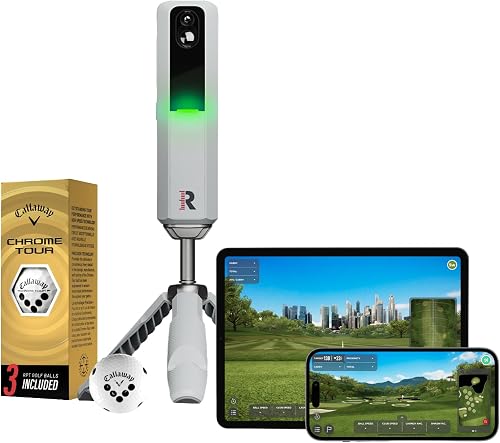
- Doppler radar and dual camera
- 15 key metrics
- Swing video analysis
- Premium trial included
The MLM2PRO is a useful third option if radar and dual-camera capture with 15 metrics matters more than the R10 or SC4 Pro's display approach. Premium features include a 21-day trial.
Pros
- Combines Doppler radar and dual cameras
- Captures 15 key metrics
- Includes a 21-day Premium/Core trial
Cons
- Premium course access is tied to a membership
- Uses a mobile-device workflow
Frequently asked questions
Is the Garmin R10 or Voice Caddie SC4 Pro better?
The Garmin R10 suits golfers who want Garmin Golf app metrics and automatic swing video clips, while the Voice Caddie SC4 Pro suits golfers who prefer a built-in screen and voice output. Compare the interface and practice modes you will use most, then check their simulator requirements.
Does the Garmin R10 have a built-in screen?
No. The R10 pairs with a compatible smartphone and the Garmin Golf app for metrics, shot dispersion and recorded swing clips.
The SC4 Pro has a built-in screen, so it can be a better fit if you want the device itself to show information.
Does the SC4 Pro require special golf balls?
No. Voice Caddie says the SC4 Pro works with standard golf balls indoors or outdoors.
That removes the need to buy specially marked balls for its stated use, though you should follow the setup instructions for your practice space.
Do the Garmin R10 and SC4 Pro include simulator features?
Both offer simulator-related features, but access works differently. Garmin describes virtual rounds on over 42,000 courses with an active subscription, while the SC4 Pro includes access to a 3D Driving Range and E6 Connect.
Check each app and service's current terms before choosing.


