9 Best Launch Monitors for a Home Golf Simulator (October 2026)
The best launch monitors for a home golf simulator include the Garmin Approach R10 for flexible home practice, the Rapsodo MLM2PRO for swing video analysis, and the Voice Caddie SC4 Pro for phone-free practice.
On this page (8 sections)
- Which launch monitors suit a home golf simulator?
- How do you choose the best launch monitor for a home simulator?
- Is radar or camera tracking better indoors?
- What should you measure before setting up a home simulator?
- How should you prepare for a first session?
- What mistakes make a home simulator harder to use?
- Do home golf simulator launch monitors need subscriptions?
- Which launch monitor should you choose for a home simulator?
The best launch monitor for a home simulator depends on the room and the kind of practice you want. The Garmin Approach R10 is the flexible pick for home and range sessions, while the Rapsodo MLM2PRO adds dual-camera swing analysis and the Uneekor Eye Mini models suit PC-based indoor bays.
A home simulator might be a mat and net in a garage, or a dedicated room with a computer and impact screen. The right monitor should fit your available space, your preferred software and the device you want to use during a session.
Start with our guide to golf launch monitors and how to pick one if you’re still deciding which type fits your game. For a closer look at the options, compare the best golf launch monitors under 1,000 dollars and use the golf launch monitor comparison chart to narrow the field.
Our picks at a glance
-
1

-
2
-
3

Which launch monitors suit a home golf simulator?
The Garmin Approach R10 suits flexible home and range practice, while the Rapsodo MLM2PRO is a stronger fit when video analysis matters. For a fixed indoor bay, compare the computer-based Uneekor models with camera-based options such as the Bushnell Launch Pro Circle B.
Garmin Approach R10: Best for flexible home practice
- Portable design
- Garmin Golf app shot tracking
- Virtual rounds on over 42,000 courses with active subscription
- Up to 10 hours of battery life
A portable unit for practice at home or on the range, with app-based shot data and virtual course play that requires an active subscription.
Pros
- Up to 10 hours of battery life
- Training mode tracks stats by club
- Records swing video with metrics in the Garmin Golf app
Cons
- Virtual course play requires an active subscription
- Shot dispersion chart is based on estimated ball flight
The Garmin Approach R10 suits golfers who want one portable monitor for indoor sessions and range practice. Paired with the Garmin Golf app on a compatible smartphone, it tracks club head speed, ball speed, swing tempo, spin, launch angle and other shot details.
Training mode organizes stats by club and shows shot dispersion based on estimated ball flight. The app can also record swing video clips with the metrics from that swing.
Garmin’s virtual course play covers more than 42,000 courses, but it requires an active subscription. The R10 also runs for up to 10 hours between charges, which helps if you move between home and the range.
Choose the R10 if you want a phone-based setup that can travel with you. Skip it if you want a monitor with its own large display or a PC-centered simulator built around a fixed bay.
For net placement and the room behind the ball, see our guide to using a launch monitor when hitting into a net.
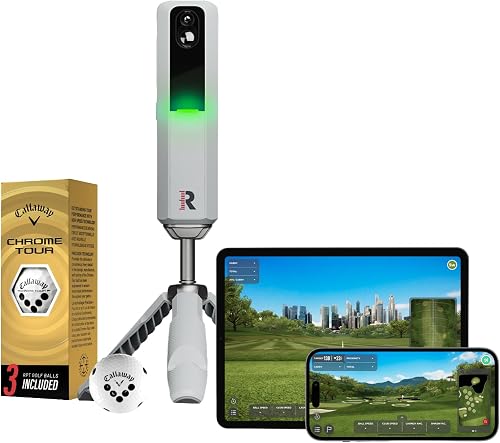
Rapsodo MLM2PRO: Best for swing video analysis
- Doppler radar and dual camera setup
- 15 key metrics
- Swing video and impact video tools
- 30,000+ home simulator courses with Premium
Combines radar and cameras with shot metrics and swing video tools. Premium features, including simulated courses, are available through a trial and membership.
Pros
- Radar and dual camera setup
- Slow-motion view of club and ball contact
- Indoor and outdoor use
Cons
- Premium course and app features are subscription-based
- Uses a smartphone
The Rapsodo MLM2PRO combines Doppler radar with a dual-camera setup, making it a strong choice for golfers who want more than a distance number. It tracks spin rate, spin axis, carry, club speed and club path, and it records swing footage with slow-motion views of club and ball contact.
It works with iOS and Android devices, so a compatible phone or tablet is part of the simulator plan. Its video and metrics can help you review a shot and the movement that produced it in the same practice session.
Rapsodo includes a 21-day Premium/Core trial. Premium access includes simulated courses and training tools, with more than 30,000 home simulator courses available through Premium.
Choose the MLM2PRO if swing video, impact views and a broad set of metrics will shape your practice. Skip it if you want to avoid a phone-based workflow or don’t want course play to depend on a membership.
Voice Caddie SC4 Pro: Best for phone-free practice
- Built-in screen
- 3D Driving Range and E6 Connect access
- Practice, target and speed training modes
- Standard golf balls
Its built-in screen and multiple training modes suit golfers who want a dedicated unit for practice. The SC4 Pro also connects to the VOICECADDIE S app.
Pros
- Built-in screen with voice output
- No specially marked balls required
- 3D Driving Range and E6 Connect included
Cons
- Advanced app features require a compatible phone
- Check the simulator setup needs before choosing a room
The Voice Caddie SC4 Pro suits golfers who want a built-in screen for practice. It includes a 3D Driving Range and E6 Connect access, alongside practice, target and swing speed modes.
It works indoors and outdoors with standard golf balls, so you don’t need specially marked balls for its stated use. The VOICECADDIE S app adds statistical analysis and other features when you want to review more detail.
Choose the SC4 Pro if you want the monitor itself to handle basic session viewing and training modes. Skip it if a particular simulator platform or a PC projection setup is central to your plan and you haven’t confirmed compatibility and room requirements.
SkyTrak ST MAX: Best for structured skill drills

- 1 year of Core Foresight software included
- Measures ball and club data
- Skills assessments and bag mapping
- Dual USB-C ports
The ST MAX focuses on game improvement tools such as skills assessments, bag mapping and a wedge matrix. Core Foresight software is included for 1 year.
Pros
- Broad set of ball and club measurements
- Skills assessments and randomized practice
- Dual USB-C ports
Cons
- Long-term software costs need checking
- Room layout and space requirements should be confirmed
The SkyTrak ST MAX fits golfers who want a practice plan built around skills assessments, bag mapping and distance work. It measures carry and total distance, ball speed, spin, launch angle, club head speed, smash factor, club path, face angle and face-to-path.
Game improvement tools include randomized practice and a wedge matrix. One year of Core Foresight software is included, and dual USB-C ports allow charging while data transfers.
Choose the ST MAX if you’ll use drills and bag mapping in a home simulator. Skip it if you’re looking for a simple phone-first monitor or you haven’t checked what software will cost after the included year.
FlightScope Mevo Gen2: Best for included course play

- 18 swing data parameters
- Front-facing camera
- 8 E6 simulation courses
- Up to 6 hours of battery life
The Mevo Gen2 combines shot data with camera video and data overlays. Its included E6 Connect bundle provides 8 courses, and FlightScope says there are no subscription or annual license fees.
Pros
- Front-facing camera records swings with data overlays
- Range ball setting for outdoor practice
- Includes 8 E6 Connect courses
Cons
- Up to 6 hours of battery life
- Needs a suitable app-connected device
The FlightScope Mevo Gen2 combines a portable monitor with video and data overlays. It has 18 parameters for full swing, chipping and putting, plus a front-facing camera that can show ball flight and metrics such as speed and carry on the video.
The unit is intended for indoor and outdoor use, and a range ball setting supports outdoor practice. Its bundle includes 8 E6 Connect courses, GPS overview, the FS Golf app and video features; FlightScope says the bundle has no subscription or annual license fees.
Battery life is up to 6 hours. Choose Mevo Gen2 if you want an included course bundle and video feedback in a unit you can also bring to the range.
Skip it if you need a longer session between charges or want a display-first experience without relying on an app-connected device.
Uneekor Eye Mini Core: Best for a compact PC bay

- High-speed cameras and infrared sensors
- 15 ball data points
- Reads any dimple pattern
- Works with GSPro, E6 Connect and TGC19
A camera-based option for a home simulator built around a PC or laptop. VIEW software is included, while third-party simulation software requires a subscription.
Pros
- No ball stickers required
- Works with several simulator platforms
- Includes VIEW software
Cons
- Requires a capable PC or laptop
- Some features need software upgrades or subscriptions
The Uneekor Eye Mini Core is for a home simulator built around a PC or laptop. High-speed cameras and infrared sensors track 15 ball data points, and Dimple Optix reads any dimple pattern without requiring ball stickers.
VIEW software includes swing analysis and session reports. The Core also works with GSPro, E6 Connect, TGC19 and Creative Golf 3D, which require subscriptions.
Choose the Eye Mini Core if your room is planned around a computer and you want camera-based tracking without marked balls. Skip it if you want a portable monitor that works as a self-contained unit or a phone-led practice setup.
Before choosing the Core, check that your computer meets the requirements for VIEW or your intended simulation software. Those needs differ depending on how you plan to use it.
Uneekor Eye Mini Lite: Best for club impact visuals

- 19 real-time metrics
- Dimple and Club Optix
- PC or laptop required
- Works with GSPro, E6 Connect and TGC19
The Eye Mini Lite is built around a computer-based indoor setup, with real-time metrics and camera views of the club at impact. Simulation platforms require subscriptions.
Pros
- Tracks 19 real-time metrics
- Reads any dimple pattern
- VIEW Player Package included
Cons
- Needs a PC or laptop
- Simulation and AI features have specific computer requirements
The Uneekor Eye Mini Lite is aimed at a fixed indoor bay where real-time camera views are part of the practice. It tracks 19 metrics and includes Dimple Optix and Club Optix views, plus the VIEW Player Package.
It works with GSPro, E6 Connect, TGC19 and Creative Golf 3D, which require subscriptions. Uneekor sets specific computer requirements for VIEW and for simulation with AI; the latter also calls for a dual display.
Choose the Eye Mini Lite if you have a capable computer and want club visuals at impact. Skip it if you want an uncomplicated portable setup or don’t have room for the computer and display requirements.
If you’re planning the hitting surface and target area around a fixed bay, see our guide to golf impact screens for launch monitor practice.
Blue Tees Rainmaker: Best for standalone screen modes

- 4.3-inch display
- 20+ ball and club metrics
- 12-month Premium LAUNCH App membership included
- E6 Connect and GSPro compatible
Rainmaker pairs a built-in display with simulator compatibility and a 12-month app membership. It also has standalone practice, target distance and swing speed modes.
Pros
- Large built-in display
- 12-month app membership included
- Works with E6 Connect and GSPro
Cons
- App membership beyond the included period needs checking
- Simulator setup space still matters
The Blue Tees Rainmaker suits golfers who want on-device practice modes and a large display. Its 4.3-inch screen presents a monitor with more than 20 ball and club metrics, while practice, target distance and swing speed modes can run without a mobile device.
For simulator use, Rainmaker is compatible with E6 Connect and GSPro. The included 12-month Premium LAUNCH App membership adds 3D range simulation, analytics and shot data storage.
Choose Rainmaker if you want a screen on the monitor and a year of app features included. Skip it if you want to decide only after understanding the app terms beyond that period or need a software combination you haven’t checked.
Bushnell Launch Pro Circle B: Best for impact-based camera data

- Three-camera imaging system with infrared
- Indoor and outdoor use
- Ball data included
- Club data requires an active subscription
The camera-based Launch Pro measures ball data at impact for indoor or outdoor practice. Club data requires an active subscription, so include that ongoing requirement in your choice.
Pros
- Three-camera imaging system with infrared
- Ball data included
- Can be used in a simulator room or at the range
Cons
- Club data requires an active subscription
- Simulator membership options need checking
The Bushnell Launch Pro Circle B is for golfers who prioritize camera-based measurement at impact. Its three-camera imaging system uses infrared, and ball data is included; club data requires an active subscription.
It’s intended for indoor and outdoor practice, including a garage, range or simulator room. The package includes a 30-day trial of Foresight+ membership, with Silver or Gold options and course pass choices.
Choose it if you want a camera-based system and have reviewed the membership terms for your intended use. Skip it if you want club data without a recurring subscription or want a phone-first monitor you can carry between sessions.
How do you choose the best launch monitor for a home simulator?
The best launch monitor for a home simulator is the one that fits your hitting area, software plan and practice routine. Settle those three choices before comparing data counts or extra features.
First, decide whether the simulator will be temporary or permanent. A portable unit is easier to move between a home net and the driving range, while a PC-based camera system makes more sense when the computer and bay will stay in one place.
Next, list the software you actually want to use. Check compatibility for each monitor and note which functions depend on an active membership, trial or included software period.
Finally, choose the information that will change how you practice. If swing video matters, look closely at Rapsodo and FlightScope; if you want club and ball metrics with structured drills, consider SkyTrak; if on-device viewing matters, compare SC4 Pro and Rainmaker.
More numbers don’t automatically make a better fit. A monitor that suits your room and helps you follow a repeatable practice plan is more useful than a feature set you won’t use.
Is radar or camera tracking better indoors?
Radar and camera systems can both work indoors, but they use different approaches and can shape where you place the monitor. Choose the one whose setup matches the bay you can build.
Garmin, FlightScope and Blue Tees describe radar tracking, while Rapsodo pairs Doppler radar with dual cameras. FlightScope also combines Doppler tracking with synchronized image processing.
Uneekor’s Eye Mini models use high-speed cameras and infrared sensors, and the Bushnell Launch Pro Circle B uses a three-camera imaging system with infrared. These options suit golfers considering an indoor space organized around camera-based tracking.
Before settling on a type, review the manufacturer’s setup directions for your intended room. The monitor, hitting position, ball containment and target area need to work as a single layout.
If you want a broader explanation of the approaches, read how radar golf launch monitors work and what a camera-based launch monitor is.
What should you measure before setting up a home simulator?
Measure swing clearance and the whole hitting area before you buy equipment. Include space for the monitor, mat, net or screen, display and a safe path around the bay.
Start with the golfer’s swing area, including club length and the backswing. Then mark where you expect to stand, where the ball will sit and where the screen or net will catch it.
Place the monitor according to its setup instructions and leave space for its sensors to read shots. Don’t assume that a device can sit anywhere near the ball just because it is portable.
For a simple arrangement, a portable monitor and net may be enough. A fixed simulator can add a computer, projector or screen, but those components also take up room and need to fit the same plan.
Measure again after laying out the mat and containment area. This helps catch conflicts before you buy equipment that leaves too little room to swing or walk around the setup.
Our guides to golf simulator hitting mats and golf simulator enclosure kits can help with the rest of the bay plan.
How should you prepare for a first session?
Set up the bay consistently, pair the monitor with its intended device or software, and confirm the hitting position before recording a full session. A repeatable routine helps keep setup changes from looking like changes in your swing.
Charge a portable monitor before a longer practice session and place it where the manufacturer directs. Keep the phone, tablet or computer close enough for the app and data review you plan to use.
Use the ball type and any markers or stickers required for your chosen system. The SC4 Pro uses standard balls, while the Uneekor Core reads any dimple pattern without stickers; follow the setup instructions for all other models.
Start with a few shots and check that the device is recognizing them as expected. If readings or video look inconsistent, recheck alignment, placement and the selected mode before changing your swing.
After practice, put portable equipment in its case and store charging cables together. For fixed bays, keep the hitting area clear and check cables and the computer before each session.
What mistakes make a home simulator harder to use?
The most common planning mistakes are buying before measuring, overlooking software terms and choosing features without a practice purpose. Each can leave you with a monitor that doesn’t suit the room or routine you intended.
A net doesn’t remove the need for a safe swing area. Confirm ceiling height and clearance for your full swing, then make sure ball containment and the monitor position fit the same layout.
Don’t treat a trial as permanent access. Garmin virtual rounds, Rapsodo Premium features, and Uneekor’s third-party software have subscription requirements; Bushnell’s club data also requires an active subscription.
Another mistake is assuming all monitors rely on the same screen or computer. The Garmin and Rapsodo options pair with a phone, the SC4 Pro and Rainmaker have built-in displays, and Uneekor requires a PC or laptop.
Finally, avoid changing several setup details at once when readings seem off. Check placement, alignment, ball position and the selected mode one at a time so you can identify what changed.
Do home golf simulator launch monitors need subscriptions?
Some monitors require subscriptions for certain simulator, app or club-data features, while others include software for a fixed period or a course bundle. Compare the features you plan to use and what remains after a trial or included term.
Garmin virtual course play needs an active subscription. Rapsodo’s 21-day trial includes Premium/Core access, and its Premium features include simulated courses and training tools.
Uneekor requires subscriptions for third-party simulation platforms. Bushnell requires an active subscription for club data, while Rainmaker includes 12 months of Premium LAUNCH App membership.
The Mevo Gen2 bundle includes 8 E6 Connect courses, and FlightScope says there are no subscription or annual license fees for that bundle. SkyTrak includes one year of Core Foresight software.
Before buying, write down the software features you want and check which require payment after any trial or included period. That makes the ownership cost clearer than comparing course counts alone.
Which launch monitor should you choose for a home simulator?
Choose the Garmin Approach R10 for flexible app-based practice, the Rapsodo MLM2PRO for swing video, and a Uneekor Eye Mini for a computer-based indoor bay. The right pick depends on whether you’ll move it, what you want to review and how much of the room is dedicated to golf.
Pick the SC4 Pro or Rainmaker if a built-in display matters. Choose the FlightScope Mevo Gen2 for portable video and included E6 courses, or the SkyTrak ST MAX if skills assessments and bag mapping will guide practice.
The Bushnell Launch Pro Circle B suits a buyer focused on camera-based impact measurement who has accounted for its club-data subscription. If you’re comparing by budget and feature mix, review the best golf launch monitors under 1,000 dollars and check the launch monitor comparison chart against your room plan.
For most golfers building a flexible home setup, the Garmin Approach R10 is the best launch monitor for a home simulator to start with. Choose a camera-based Uneekor for a fixed PC bay, or the Rapsodo MLM2PRO when swing video is central to the way you practice.
Our top 3 picks at a glance
-
1
-
2
-
3
Frequently asked questions
What is the best launch monitor for a home simulator?
The Garmin Approach R10 is a flexible choice for home practice, range use and app-based virtual rounds. The Rapsodo MLM2PRO adds dual cameras and swing video tools, while the Uneekor Eye Mini models suit a dedicated computer-based indoor bay.
Choose by room setup, software needs and the data you want to see.
Do home golf simulator launch monitors need a subscription?
Some simulator and app features require a subscription, while others are included. Garmin virtual course play needs an active subscription, and Uneekor third-party platforms require subscriptions.
FlightScope says its Mevo Gen2 bundle has no subscription or annual license fees.
Check which features matter to you and whether they stay available after any trial.
Can I use a launch monitor in a garage?
Yes, if the space gives you room to swing and the monitor can be set up as intended. Check the device placement, ball flight area, ceiling height, power and software requirements before buying.
A net can help contain shots, but it doesn't replace the space needed for your swing.
Are camera or radar launch monitors better indoors?
Both camera and radar systems can be used indoors, but their setup needs differ. The Uneekor models use high-speed cameras and infrared sensors, while Garmin, Rapsodo, FlightScope and Rainmaker describe radar-based tracking.
Compare placement, lighting or computer needs and the simulator software you plan to use.


