8 Best Golf Simulator Hitting Mats (October 2026)
The best golf simulator hitting mats include the GoSports Elite Hitting Mat for a square stance, the Bltend 36mm Golf Mat for cushioned floors, and the Fanshaw Dual-Turf Mat for fairway and rough.
On this page (6 sections)
- Which golf simulator hitting mat fits each setup?
- How do you choose a golf simulator hitting mat?
- How do you set up a golf simulator hitting mat?
- What common golf simulator mat mistakes should you avoid?
- How should you care for and use a golf simulator hitting mat?
- Which golf simulator hitting mat should you choose?
The GoSports Elite Hitting Mat is the best golf simulator hitting mat for a roomy, single-turf setup. It combines a square 5 x 5 ft surface with an EVA base and multiple tee positions, while the other picks add cushioning, varied lies or floor coverage.
Measure the full setup before buying: stance area, ball position, screen distance and monitor space all affect the fit. Our guides to golf impact screens and simulator enclosure kits can help you plan the rest of the bay.
Our picks at a glance
-
1
-
2

-
3

Which golf simulator hitting mat fits each setup?
The GoSports Elite suits a dedicated bay with room for a broad square stance, while the other mats serve more specific needs. Pick by usable floor space, turf layout, tee method and whether you need the mat to move.
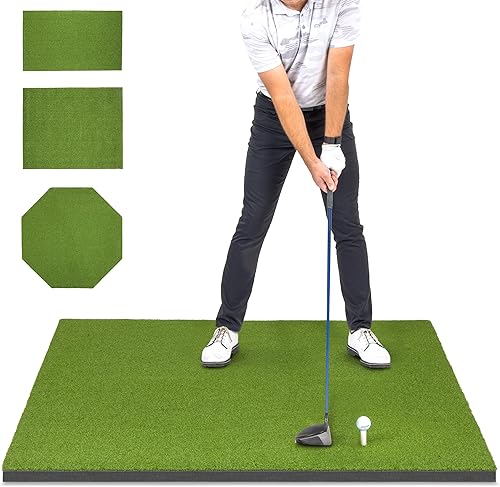
GoSports Elite Hitting Mat: Best for a square stance
- 5 x 5 ft surface
- EVA foam base
- 12 tee holes
- Includes 3 rubber tees
A square 5 x 5 ft hitting surface gives you room to set your stance and ball position. Twelve tee holes support several setups for right- and left-handed golfers.
Pros
- Square 5 x 5 ft surface
- EVA foam base
- 12 tee holes
Cons
- Single turf type
- Larger footprint needs room in the sim bay
The GoSports Elite has a 5 x 5 ft square surface and an EVA foam base. The wide footprint gives you room to set your feet and ball position, and 12 tee holes support several setups for right- and left-handed golfers.
Three rubber tees in different heights are included for driver, iron and wedge practice. At 27 lb, this foldable mat makes the most sense when you can leave it set up in a dedicated bay.
Choose it if you want one consistent turf surface and flexibility in tee position. Skip it if your room cannot spare a 5 x 5 ft footprint or you want separate fairway and rough lies.
Bltend 36mm Golf Mat: Best for cushioned floors
- 5 x 4 ft surface
- 36 mm total thickness
- EVA foam backing
- 6 tee positions
This 5 x 4 ft mat pairs dense turf with a 20 mm EVA pad. Six tee positions give you options for different clubs and handedness.
Pros
- 36 mm total thickness
- 5 x 4 ft hitting area
- Includes balls and tees
Cons
- Single turf type
- Rectangular footprint may not suit every stance
The Bltend 36mm Golf Mat suits a simulator setup where a substantial cushioned build is a priority. It has a 5 x 4 ft surface, with 16 mm turf over a 20 mm EVA pad.
Six tee positions support different ball placements. The set also includes practice balls, tees and a rubber tee holder, so you have a few basic practice items on hand.
Choose Bltend if a 5 x 4 ft rectangle fits your stance and you prefer a thick single-turf mat. Skip it if you need multiple lie types or want a larger 6 x 4 ft surface.
Fanshaw Dual-Turf Mat: Best for fairway and rough
- 6 x 4 ft surface
- Dual-turf zones
- EVA foam base
- Accepts a tee
The large surface combines smooth fairway turf with rough turf for varied practice lies. A tee-insertion area supports tee shots.
Pros
- Fairway and rough turf
- Large 6 x 4 ft area
- Rolls for storage
Cons
- Does not state a warranty
- Dual turf rather than three distinct zones
The Fanshaw Dual-Turf Mat suits golfers who want fairway and rough areas in one station. At 6 x 4 ft, it has room for a full stance and more than one ball position.
Smooth fairway turf and rough turf cover different practice lies. The mat has an EVA foam base, an anti-slip bottom and a tee-insertion area, and it rolls for storage.
Choose Fanshaw for two distinct turf types and a mat you can roll away. Skip it if a specific three-zone layout is important, or if you need a stated warranty before buying.
GoSports Simulator Turf: Best for a finished sim bay

- 6 ft deep
- 10, 12 or 15 ft widths
- 15 mm turf
- Carpet tape included
This broad turf section finishes the floor beneath a simulator enclosure or net. Pair it with a separate hitting mat for the main impact area.
Pros
- Several widths for different bays
- Helps dampen ball rebounds
- Carpet tape included
Cons
- Hitting mat is sold separately
- Not foldable
GoSports Simulator Turf covers the floor beneath an enclosure or net. Its 6 ft depth and available 10, 12 or 15 ft widths let you match the turf section to a broader bay.
The 15 mm synthetic turf can sit beneath a separate hitting mat. Double-sided tape is included for hard floors, and small cable openings can be cut for items such as a projector, sensor or hitting monitor.
Choose this for a finished floor surface and help damping ball rebounds. Skip it if you need a stand-alone hitting surface, since the hitting mat is sold separately, or if you need flooring you can fold away.
Laxcredu Mat with Ball Tray: Best for fewer ball pickups

- Built-in tray holds 32 balls
- 6 x 4 ft size
- Fairway and rough turf
- Foam backing
A built-in tray holds 32 balls, so you can load several shots before pausing to collect them. Short and long turf sections offer different lies.
Pros
- 32-ball tray
- Two turf heights
- No assembly needed
Cons
- Tray and turf layout need space
- Tee-hole positions are not specified
The Laxcredu Mat with Ball Tray is a fit for repeated shots with fewer pauses to reload. Its 6 x 4 ft surface includes a tray that holds 32 balls.
Two turf heights provide fairway and rough areas: 11 mm short grass and 35 mm long grass. The foam-backed mat needs no assembly and comes with plastic and rubber tees.
Choose it if the built-in ball storage suits your practice routine and you have room for the tray. Skip it if your ball position depends on specific tee-hole placement, since the positions aren't specified.
NiuMid Tri-Turf Mat: Best for three lie types

- 6 x 4 ft surface
- Three turf zones
- 15 mm EVA padding
- Accepts real tees
Three turf heights cover tee, fairway and rough practice on one large mat. The tee area accepts real tees.
Pros
- Three distinct turf heights
- EVA foam padding
- Large 6 x 4 ft surface
Cons
- No exact zone layout is stated
- Included tee details are limited
The NiuMid Tri-Turf Mat combines three turf heights on a 6 x 4 ft surface. Its zones range from 31 to 55 mm, and the tee turf accepts real tees.
A 15 mm EVA foam layer sits below the turf. The zone arrangement is not specified, so make sure its layout works for your stance and preferred ball position before choosing it.
Choose NiuMid if you want three turf heights and real-tee use on a large mat. Skip it if you need the zone placement spelled out in advance; the TriZone Pro names each zone and its height.
TriZone Pro Tri-Turf Mat: Best for defined turf zones

- 6 x 4 ft surface
- 13 mm fairway, 25 mm tee line and 35 mm rough
- 15 mm EVA base
- 9 tees included
The stated zone heights make this tri-turf mat easy to match to fairway, tee and rough practice. It includes rubber, wooden and plastic tees.
Pros
- Three named turf zones
- 15 mm EVA foam base
- 9 tees included
Cons
- Larger than a compact stance mat
- Care instructions call for spot cleaning
The TriZone Pro Tri-Turf Mat makes its fairway, tee line and rough easy to distinguish. The zones measure 13 mm, 25 mm and 35 mm, respectively, across a 6 x 4 ft surface.
It has a 15 mm EVA base and comes with 9 tees across rubber, wooden and plastic types. The mat is foldable and weighs about 17 lb, which can help if you need to put the practice area away.
Choose TriZone Pro if named turf zones and a selection of tees match your practice plan. Skip it if 6 x 4 ft is too large or you don't need different lies.
Premium Pro Turf 4x5 Tee Mat: Best for wooden tee shots

- 4 x 5 ft surface
- 1.25 in thick
- Holds a wooden tee
- Nylon turf
This 4 x 5 ft nylon mat holds a wooden tee, making it a straightforward option for tee shots and general practice.
Pros
- Holds wooden tees at different heights
- Indoor or outdoor use
- 4 x 5 ft surface
Cons
- One tee hole
- No multi-turf zones
The Premium Pro Turf 4x5 Tee Mat suits golfers who want a wooden tee in a simple surface. Its 4 x 5 ft nylon mat is 1.25 in thick and has a single tee hole.
That design keeps the choice straightforward for tee shots and general practice, without separate fairway and rough zones. It is described for indoor and outdoor use.
Choose it if a wooden tee and compact rectangular footprint meet your needs. Skip it if you want several ball positions or a separate tee line for both handedness setups.
How do you choose a golf simulator hitting mat?
Choose a golf simulator hitting mat by measuring your stance and hitting area first, then matching the surface and tee layout to your practice. Cushioning, portability and the position of the ball all matter in a simulator bay.
What size golf simulator hitting mat fits your stance?
A mat should fit both feet and the ball without forcing you to stand at its edge. The GoSports Elite is 5 x 5 ft; several options measure 6 x 4 ft, while the Bltend and Premium Pro Turf mats are 5 x 4 ft.
Measure the usable floor, not just the width between walls. Include room for a full swing, the screen, and any monitor positioned near or behind the ball.
If you use a net instead of an impact screen, see our guide to using a launch monitor when hitting into a net. The device and target setup can affect where the hitting position belongs.
Does turf type matter on a golf simulator hitting mat?
Yes. Single-turf mats give you one consistent hitting surface, while dual- and tri-turf mats add lie choices such as fairway, tee line and rough.
The Fanshaw combines fairway and rough turf. The TriZone Pro has named fairway, tee-line and rough zones, while the NiuMid has three heights but doesn't specify their layout.
More turf zones are useful only if you can put the ball on the desired zone and keep a comfortable stance. Check how the zones sit on the mat before buying.
How much cushioning should a simulator mat have?
Compare the mat's total height, turf and backing with the floor beneath it. Bltend describes a 36 mm total build with 16 mm turf and a 20 mm EVA pad, while several other picks specify an EVA base.
A thicker mat also raises your feet relative to the ball and the surrounding floor. If you add broad floor turf under a hitting mat, account for that height difference when setting your stance and ball position.
Do tee holes or inserts change which mat to buy?
They matter if you take a lot of tee shots or need to shift the ball for different clubs. The GoSports Elite has 12 tee holes, the Laxcredu includes a tray but does not specify hole positions, and the Premium Pro Turf has one hole for a wooden tee.
Other designs accept real tees in a dedicated turf area or include rubber tees. Decide whether you want to insert your own tee, use supplied tees, or keep the hitting area simple.
Should the mat stay in place or roll away?
A permanent simulator bay can accommodate a larger mat if the footprint fits. Foldable or rollable designs are easier to store, while broad GoSports Simulator Turf is meant to cover the floor and is not foldable.
Check the size, weight and stated form before choosing. If you install floor turf with tape, plan the layout and cable paths first so you know where the hitting mat will sit.
How do you set up a golf simulator hitting mat?
Set the mat where you can swing freely and place the ball within your launch monitor's required hitting area. Confirm your monitor's setup directions before fixing the ball position or securing floor turf.
Measure the distance from ball to screen and from ball to monitor. Mark the hitting spot, then rehearse your stance and swing path to confirm that neither the mat edge nor nearby equipment crowds you.
If you plan to use a full floor section, fit it to the bay before placing the hitting mat. GoSports Simulator Turf includes double-sided tape for hard surfaces, and small openings can be cut for cables.
For device placement, compare our home golf simulator launch monitor guide and overview of golf launch monitor types and choices. Match the ball position to the monitor requirements rather than moving the device to compensate for a poorly placed mat.
What common golf simulator mat mistakes should you avoid?
The most common mistakes are buying by thickness alone, overlooking stance room and assuming every mat has the tee position or turf layout you need. A quick measurement and setup plan can prevent those mismatches.
Don't measure only the hitting strip. Account for your feet, club path, screen clearance, monitor location and any floor turf that will sit beneath the mat.
Don't assume a thick mat automatically fits your setup. Added height can change your stance and the surrounding floor level, so check total thickness along with the base material and turf layout.
Don't buy a multi-zone surface without checking where the zones sit. If you need a specific fairway or tee area under the ball, choose a mat with a layout that supports that position.
Don't overlook storage and installation. A foldable hitting mat and non-foldable floor turf solve different problems, and taped floor coverage needs a planned footprint.
How should you care for and use a golf simulator hitting mat?
Keep the mat's hitting area clear and follow its specific care directions. For the TriZone Pro, spot cleaning is the stated care method, and it can be stored flat or rolled.
After a session, remove loose balls and tees, then check that the mat has not shifted before your next practice. A non-slip base can help hold position, but the surface should still sit flat and securely on the floor.
If you move a foldable or rollable mat, store it in the form intended for that design. Keep cables clear of the stance and swing area, and check that the mat still aligns with the launch monitor when you set it back down.
Which golf simulator hitting mat should you choose?
Choose the GoSports Elite for a square stance area and many tee positions, Bltend for a thick cushioned single-turf build, and Fanshaw for fairway and rough practice. Pick GoSports Simulator Turf to cover the bay floor, or choose a tri-turf model when varied lies are central to your routine.
The Laxcredu tray suits repeated shots with fewer ball pickups, while Premium Pro Turf keeps tee practice simple with a wooden tee. Before you decide, compare the mat's footprint with your swing space, then plan the rest of the bay with an impact screen and a simulator enclosure.
Our top 3 picks at a glance
-
1
-
2
-
3
Frequently asked questions
What size golf mat works for a simulator?
A 5 x 4 ft or 6 x 4 ft mat gives many golfers room to stand and hit, while a 5 x 5 ft square mat offers a wider stance area. Measure your bay, stance position and monitor placement before choosing.
Leave enough space for a full swing and for the ball to reach the screen safely.
Do I need a separate hitting mat and simulator turf?
You can use a hitting mat alone, but broad simulator turf can cover more of the floor and give the bay a finished surface. GoSports Simulator Turf is 6 ft deep and comes in several widths, while its hitting mat is sold separately.
Check the planned turf and mat dimensions together.
Is a thicker golf simulator mat better?
Thickness alone doesn't tell you how a mat will feel or fit your swing. Compare the base material, total height, turf type and surface stability, then consider how often you'll practice and what floor sits underneath.
A thick mat also raises your stance, so account for that when setting up the hitting area.
Should I choose single-turf or tri-turf?
Choose single-turf for a simple, consistent hitting surface. A dual- or tri-turf mat adds different lie types, such as fairway and rough, for varied practice.
Check the zone dimensions and where the ball sits so the turf layout works with your stance and simulator.
Can I use a golf mat with a launch monitor?
Yes. A hitting mat can provide the ball and stance surface in a simulator setup, but the monitor still needs its own placement and clear space.
Check the monitor's setup requirements before fixing the mat position.
Our guide to launch monitors for a home golf simulator covers room and device choices.


