Golf Launch Monitor Comparison Chart
The best launch monitor for you depends on what you want to measure and how you practice: compare its metrics, display and phone needs, along with whether you want speed training, range feedback or simulator features.
On this page (5 sections)
A golf launch monitor comparison chart helps you match a device to the data and practice setup you want. These six options differ in their metrics, screens, phone needs, video features and simulator access.
| Launch monitor | Data and display | Phone or app role | A useful fit |
|---|---|---|---|
| Garmin Approach R10, 9.2 | More than a dozen metrics, including club speed, ball speed, spin and launch angle | Garmin Golf app for metrics, video and simulator features | Range practice and home simulation features |
| Rapsodo MLM, 8.8 | Ball speed, club speed, launch angle, carry distance and shot shape | iPhone or iPad required | Range or backyard practice with video replay and shot tracer |
| PRGR HS 130-A, 8.7 | Club and ball speed, smash factor, total and carry distance | No app, Wi-Fi or Bluetooth required | Speed training, including swings without a ball |
| Rapsodo MLM2PRO, 8.5 | 15 metrics, including spin rate, spin axis, club path and launch angle | Mobile app and premium features | Indoor practice and simulation features |
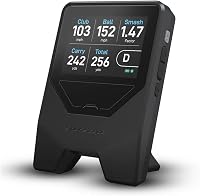
| Shot Scope LM1, 8.4 | Ball speed, club speed, smash factor, total and carry distance; built-in color screen | Phone not needed to view data; app for session history | On-course, range or speed sessions with session history |
| FlightScope Mevo Gen2, 7.8 | 18 swing data parameters; front-facing camera | FS Golf app; listed compatibility includes iOS, Android and PC | Range or indoor use with video and an included E6 course bundle |
The table is a starting point for comparing features. Use our golf launch monitor types and selection guide if you want help deciding which kind to consider.
How do the six launch monitors compare?
The best fit depends on which features you'll use beyond distance and speed feedback. Garmin Approach R10 has the highest site score at 9.2, followed by Rapsodo MLM at 8.8 and PRGR HS 130-A at 8.7.
Our score weighs specs, features and buyer feedback against what you're shopping for. It isn't a controlled accuracy comparison.
Which launch monitor comparison chart details matter most?
Start with your must-have metrics, then compare the display and practice setting. A list of 18 parameters is useful only if it includes information you want to act on.
| Need | Compare these details |
|---|---|
| Distance gapping | Carry distance, total distance and whether the device shows shot history |
| Speed training | Club speed measurement and whether it works without a ball |
| Shot feedback | Launch angle, shot shape, spin or smash factor |
| Swing review | Video recording, replay and data overlays |
| Home simulation | Course access, compatible software and subscription terms |
| Phone-free range use | Built-in screen or device readout |
PRGR HS 130-A measures club speed without a ball and reports speed and distance readings. Shot Scope LM1 shows data on its color screen and adds app-based session history, while Rapsodo MLM pairs shot feedback with iPhone or iPad video replay.
Garmin Approach R10, Rapsodo MLM2PRO and FlightScope Mevo Gen2 describe simulator or video features. Compare compatible devices, setup needs and any subscription terms before choosing.
Which launch monitor works best without a phone?
PRGR HS 130-A and Shot Scope LM1 offer the clearest phone-free viewing options here. PRGR works without an app, Wi-Fi or Bluetooth, and LM1 has its own screen for viewing data.
PRGR HS 130-A measures club speed, ball speed, smash factor, total distance and carry distance. It stores up to 500 past swings and runs on AAA batteries.
Shot Scope LM1 measures similar core metrics and adds a dedicated speed training mode for clubs and speed sticks. It offers On-Course, Practice Range and Speed Training sessions, plus lifetime session history in the free app with no subscription required.
Choose PRGR if you want a straightforward speed tool that works without a ball. Choose LM1 if you also want on-device viewing and app-based session history.
For a closer look, see our Shot Scope LM1 launch monitor review. The PRGR HS 130-A vs Shot Scope LM1 comparison covers differences between these devices.
Which app-based monitor suits range practice?
For app-based range practice, compare how you want to review each shot. Rapsodo MLM emphasizes video replay with shot tracer, Garmin Approach R10 connects shot data with training stats and swing clips, and FlightScope Mevo Gen2 describes video with data overlays.
Rapsodo MLM reports ball speed, club speed, launch angle, carry distance and shot shape. Its app also includes GPS satellite view and shot dispersion features.
It's designed for iPhone and iPad.
Garmin Approach R10 tracks more than a dozen metrics when paired with a compatible smartphone and the Garmin Golf app. The app can show training stats for each club, a shot dispersion chart based on estimated ball flight, and video clips with swing metrics.
FlightScope Mevo Gen2 includes a front-facing camera and automatic swing video recording with data overlays. Its bundle includes an E6 Connect simulation package with 8 courses, and FlightScope says it has no subscription or annual license fees.
If your phone is central to practice, check app compatibility and whether the functions you want are available on your device. For more on phone compatibility, see which launch monitors work with iPhone and Android.
Which monitor has more simulation features?
Rapsodo MLM2PRO, Garmin Approach R10 and FlightScope Mevo Gen2 describe home simulator features, with different course access and subscription terms. Compare those details before choosing a device for simulator play.
Rapsodo MLM2PRO lists metrics including spin rate, spin axis, carry distance, club speed, club path and launch angle. Premium features include simulated courses, third-party app integration, a target range, impact vision, combine and speed training, with a 21-day Premium/Core trial.
Garmin Approach R10 supports virtual rounds on more than 42,000 courses with an active subscription and the Garmin Golf app. It also offers weekly tournaments and a global leaderboard.
FlightScope Mevo Gen2 includes a lifetime E6 Connect bundle with 8 courses and has no subscription or annual license fees, according to FlightScope. Its listed battery life is up to 6 hours; Garmin Approach R10 offers up to 10 hours.
Our best launch monitors for a home golf simulator guide compares options for indoor use. See best golf impact screens if your simulator plan includes an impact screen.
How should you choose from this comparison chart?
Choose by the feature you'll use every session, then make sure the device suits your practice space and phone. Garmin Approach R10 leads this comparison by score, while each monitor has a distinct feature mix.
- Pick Garmin Approach R10 if you want app-based club stats, swing clips and simulator access tied to an active subscription.
- Pick Rapsodo MLM if you use an iPhone or iPad and want shot tracer video with range feedback.
- Pick PRGR HS 130-A if you want a compact speed and distance readout, including club speed without a ball.
- Pick Rapsodo MLM2PRO if spin-related metrics, dual cameras and premium simulation functions are priorities.
- Pick Shot Scope LM1 if you want a built-in display, speed training and app-based session history.
- Pick FlightScope Mevo Gen2 if you want 18 swing data parameters, a front-facing camera and an E6 bundle with 8 courses.
Before choosing, compare app requirements, course terms and indoor setup needs. Our best golf launch monitors under 1,000 dollars guide narrows options by budget.
Frequently asked questions
Which launch monitor gives you the most data?
FlightScope Mevo Gen2 lists 18 swing data parameters, while Rapsodo MLM2PRO lists 15 metrics. The specific metrics differ, so compare the measures you plan to use, such as spin, carry distance, club speed or shot shape.
Which launch monitors can you use without a phone?
PRGR HS 130-A works without Wi-Fi, Bluetooth or an app, and Shot Scope LM1 displays data on its own screen. Rapsodo MLM is designed for iPhone and iPad, while Garmin Approach R10, Rapsodo MLM2PRO and FlightScope Mevo Gen2 use mobile apps for key functions.
Which launch monitor is suited to speed training?
PRGR HS 130-A measures club speed without a ball, and Shot Scope LM1 has a dedicated speed training mode for clubs and speed sticks. Choose based on whether you want a simple radar readout or an app with session history.
What should you compare for an indoor golf simulator?
Compare indoor use, simulator software, course access, phone or tablet needs, and subscription terms. Garmin Approach R10 supports virtual course play with an active subscription, Rapsodo MLM2PRO includes a 21-day Premium/Core trial, and FlightScope Mevo Gen2 includes an E6 Connect bundle with 8 courses.