Shot Scope LM1 Launch Monitor Review: Worth It? (October 2026)
The Shot Scope LM1 suits golfers who want speed and distance numbers on the device itself, with no phone needed to view shots. It tracks ball speed, club speed, smash factor, carry and total distance, but doesn't display spin.
On this page (10 sections)
- The Shot Scope LM1 at a glance
- What data does the LM1 show?
- How do you set up the Shot Scope LM1?
- What does the app add?
- LM1 vs PRGR HS 130-A
- LM1 vs Rapsodo MLM
- When does the Voice Caddie SC200 Plus make sense?
- Is the Shot Scope LM1 a good fit for home practice?
- What are the main trade-offs?
- How we scored the Shot Scope LM1
The Shot Scope LM1 suits golfers who want speed and distance numbers on the device itself, with no phone needed to view shots. It tracks ball speed, club speed, smash factor, carry and total distance, but doesn't display spin.
Its color screen, speed training mode and free app with lifetime session history cover common range needs. If you want ball-free club speed measurement, compare the PRGR; if video replay and shot shape matter more, look at the Rapsodo MLM.
The Shot Scope LM1 at a glance
The LM1 is a portable monitor for range sessions, on-course use and speed training. It displays core speed and distance metrics on its own screen, so your phone can stay in your bag while you hit.
Shot Scope LM1: Best for on-device range feedback
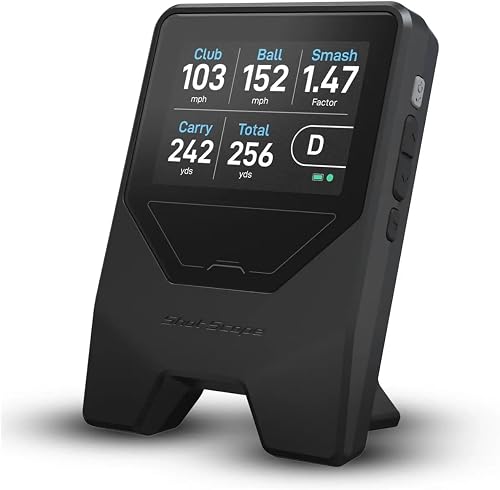
- Ball and club speed
- Smash factor
- Carry and total distance
- 3.5 in color screen
- 5+ hour battery
A compact monitor for golfers who want core speed and distance numbers on a color screen, with session history in a free app and no phone required to view shots.
Pros
- Shows data on the device
- Includes speed training mode
- Free app with lifetime session history and no subscription fees
- IPX3 rain-ready design
Cons
- Does not display spin
- App is needed to review session history
The display is 3.5 in, and the unit offers more than 5 hours of battery life from a charge. Shot Scope describes it as IPX3 rated and rain-ready for indoor or outdoor range use.
Who should consider the Shot Scope LM1?
Choose it if you want immediate feedback without having to check a phone after each shot. It also fits golfers who want one device for distance practice and speed sessions with clubs or speed sticks.
Skip it if spin is central to your practice plan. The LM1 doesn't display spin, so compare options through our golf launch monitor comparison chart if you need a wider set of metrics.
What data does the LM1 show?
The LM1 shows ball speed, club speed, smash factor, carry distance and total distance. These numbers give you a compact view of speed, strike efficiency and how far shots travel.
Smash factor relates ball speed to club speed. If you're learning how to interpret that number, read our guide to what is a good smash factor.
The LM1 does not display spin. That matters if you want to compare backspin or sidespin, or if you need those values for a simulator setup.
It also offers selectable units: mph and yards or km/h and meters. That makes it easier to keep your notes in the measurement system you already use.
How do you set up the Shot Scope LM1?
Set the LM1 about a driver's length behind the ball, choose a session type and start hitting. You don't need to calibrate it or adjust settings.
You can select On-Course, Practice Range or Speed Training sessions. For speed work, the dedicated mode works with clubs and speed sticks.
The device shows data in real time, and you don't need a phone or tablet to view it. When you want to review session history, sync with the free Shot Scope app.
For more context on placement and setup, see how to set up a golf launch monitor. Distance behind the ball and the space around your hitting area can affect which monitor suits your setup.
What does the app add?
The free Shot Scope GPS app adds lifetime session history for every shot, with no subscription fees required. Use it to review past sessions after practicing rather than as a required live display.
That split is useful if you prefer a dedicated device screen at the range but want a record of your sessions later. The LM1's main metrics are still available on the unit itself.
If you are deciding between standalone screens and phone-based systems, our guide to launch monitors for iPhone and Android covers the trade-offs. Some monitors rely on a mobile app for their live experience, while the LM1 can show its numbers without one.
LM1 vs PRGR HS 130-A
The LM1 is stronger for on-device viewing and app-based history, while the PRGR suits golfers who want to measure club speed without a ball. Both cover ball speed, club speed, smash factor, carry and total distance.
PRGR HS 130-A: Best for ball-free speed sessions

- Club speed with or without a ball
- Ball speed
- Smash factor
- Carry and total distance
- 500 swings in memory
A pocket-sized Doppler radar monitor for golfers who want speed training without hitting a ball and prefer not to use an app.
Pros
- Measures club speed without a ball
- No Wi-Fi, Bluetooth or app required
- Stores 500 past swings
Cons
- Runs on AAA batteries
- Does not include the LM1's free GPS app
The PRGR uses Doppler radar, needs no Wi-Fi, Bluetooth or app, and stores 500 past swings. It runs on AAA batteries, while the LM1 has a rechargeable battery rated for more than 5 hours and includes a USB-C charger.
For a direct breakdown of the shared metrics and speed-training differences, see PRGR HS 130-A vs Shot Scope LM1. That comparison is useful if those are the two devices you're considering.
LM1 vs Rapsodo MLM
The LM1 gives you a standalone screen and no-subscription app history, while the Rapsodo MLM adds video replay, shot tracer and shot shape through an iPhone or iPad. The choice comes down to how you want to use your phone during practice.
Rapsodo MLM: Best for video and shot shape

- Ball and club speed
- Launch angle
- Carry distance and shot shape
- Video replay with shot tracer
- iPhone and iPad app
An app-centered monitor for golfers who want video replay, shot tracer and shot shape alongside speed and distance data.
Pros
- Adds launch angle and shot shape
- Records video with shot tracer
- Maps shot dispersion and performance trends
Cons
- Works with iPhone or iPad only
- Premium offers simulator courses and game modes
Rapsodo MLM tracks ball speed, club speed, launch angle, carry distance and shot shape. Its app can also map dispersion and performance trends, while the LM1 emphasizes on-device numbers and a free app for session history.
The Rapsodo MLM works with iPhone and iPad only. Its premium option offers simulator courses and game modes, so check which app features you expect to use.
See the detailed Shot Scope LM1 vs Rapsodo MLM comparison if video and shot shape are priorities. For a broader look at device types, our golf launch monitors guide explains the main options.
When does the Voice Caddie SC200 Plus make sense?
The SC200 Plus makes sense if you want voice output and stored club statistics during practice. Its feature set also includes a swing speed mode that works without a ball.
Voice Caddie SC200 Plus: Best for voice feedback

- Voice output
- Swing speed mode
- Adjustable loft angles
- Shot data and club statistics
A portable practice option for golfers who want spoken feedback, a no-ball swing speed mode and stored club statistics.
Pros
- Provides voice output
- Includes swing speed mode
- Stores shot data and club statistics
Cons
- Its measured metrics are not specified
- Battery life is not stated
The LM1 is easier to assess if you want a clearly stated set of metrics, including carry and total distance, on a color screen. The SC200 Plus's stated strengths are voice feedback, adjustable loft angles and saved shot data.
That makes the SC200 Plus a different kind of alternative, especially for golfers who prefer spoken feedback. Compare its display and controls with your own practice habits before choosing.
Is the Shot Scope LM1 a good fit for home practice?
The LM1 can be used indoors or outdoors, but a suitable hitting area still matters. Measure the space from the ball to the monitor and check that your setup allows the recommended placement behind the ball.
A net can catch shots, but it doesn't provide the ball flight a range does. The monitor's stated metrics include carry and total distance, so consider how you plan to use those readings indoors.
For a net setup, read can you use a launch monitor when hitting into a net. It covers the practical limits of indoor practice and why choosing a compatible monitor matters.
What are the main trade-offs?
The LM1's clearest strengths are its on-device screen, core distance metrics, speed training mode and free session history. Its main limitation is that it doesn't display spin.
Its 5+ hour battery rating gives you a stated runtime for sessions away from an outlet. The IPX3 rain-ready rating adds some weather resistance, but follow Shot Scope's care guidance for wet equipment.
If you want a compact device that doesn't make your phone part of every shot, the LM1 has a straightforward feature set. If you need more shot detail, compare devices that explicitly provide the metrics or video features you use.
How we scored the Shot Scope LM1
Our score weighs the LM1's stated features against what golfers seeking a portable launch monitor need. The on-device screen, five core metrics, speed training mode and subscription-free session history support its score of 8.4.
The PRGR scores 8.7 for ball-free speed measurement and swing memory, while the Rapsodo MLM scores 8.8 for its broader shot data and video tools. Those scores reflect different priorities, so use the features that match your practice routine to make the call.
Choose the Shot Scope LM1 if you want range feedback on a color screen and session history without subscription fees. Choose the PRGR for club speed without a ball, or the Rapsodo MLM for video replay and shot shape.
For more portable options, explore our guide to best portable golf launch monitors for the range.
See the Shot Scope LM1 on Amazon{rel="sponsored nofollow"}
Frequently asked questions
What does the Shot Scope LM1 measure?
The Shot Scope LM1 measures ball speed, club speed, smash factor, carry distance and total distance. It does not display spin.
Those metrics can help you track speed and estimate club distances during practice, while golfers who need spin data should compare a monitor that provides it.
Does the Shot Scope LM1 need a phone?
No, you can view shot data on the LM1's 3.5 in color screen without a phone or tablet. The free Shot Scope app is for syncing and reviewing session history; it has no subscription fees and keeps lifetime session history.
Can the Shot Scope LM1 be used for speed training?
Yes, it has a dedicated speed training mode that works with clubs and speed sticks. That gives you a way to measure swing speed separately from range sessions focused on carry and total distance.
How does the Shot Scope LM1 compare with the PRGR HS 130-A?
Both measure club and ball speed, smash factor, carry and total distance, and both include speed training features. The PRGR measures club speed without a ball and stores 500 past swings, while the LM1 adds a color screen, a free app with lifetime session history and an IPX3 rain-ready design.


