Rapsodo MLM2PRO vs Mevo Gen 2: Which Is Better? (October 2026)
Choose the Rapsodo MLM2PRO for dual-camera swing and impact views, or the FlightScope Mevo Gen 2 for 18 practice parameters and 8 included E6 courses. Match your choice to the feedback you’ll use and the software terms that fit your plans.
On this page (7 sections)
- Rapsodo MLM2PRO vs Mevo Gen 2: which should you choose?
- How do the MLM2PRO and Mevo Gen2 measure shots?
- Which monitor gives you more useful swing video?
- How do their simulator courses and software differ?
- What should you check before setting up at home or the range?
- What common mistakes can make either monitor less useful?
- Rapsodo MLM2PRO vs Mevo Gen 2: which one fits your practice?
Choose the Rapsodo MLM2PRO for dual-camera swing and impact views, or the FlightScope Mevo Gen 2 for 18 practice parameters and 8 included E6 courses. This Rapsodo MLM2PRO vs Mevo Gen 2 comparison comes down to the feedback you want, how you plan to practice and which software costs you’re willing to carry.
The MLM2PRO pairs Doppler radar with dual cameras and highlights 15 key metrics. The Mevo Gen2 offers 18 full-swing, chipping and putting parameters, plus a front-facing camera for recording swings and adding data overlays.
Both can support indoor and outdoor practice, but their simulator offers differ. The MLM2PRO advertises access to more than 30,000 courses with Premium, while FlightScope includes 8 E6 Connect courses with the Mevo Gen2.

Rapsodo MLM2PRO vs Mevo Gen 2: which should you choose?
Choose the MLM2PRO for swing and impact review, or the Mevo Gen2 for more listed practice parameters and video overlays. Each suits a different practice routine, so decide first what you want to learn from your next session.
The MLM2PRO can capture your swing from any angle and show club and ball contact in slow motion. That makes it a strong fit if you want to review swing patterns and impact alongside shot data.
The Mevo Gen2 tracks full swings, chipping and putting, and its video tools automatically clip and save swings with data overlays. Choose it if you want to connect video review to a broader mix of practice types.
Think about simulator access before buying, too. MLM2PRO Premium features include simulated courses and third-party app integration during the 21-day Premium/Core trial, while FlightScope says the Mevo Gen2 bundle includes E6 Connect and its other named software without subscription or annual license fees.
The Mevo Gen2 is a poor fit if you need longer sessions than its up-to-6-hour battery life allows and cannot recharge between them. The MLM2PRO is a poor fit if you expect the trial’s Premium features to remain available without checking the membership terms.
For a wider view of alternatives, compare the options in our golf launch monitor comparison chart. It helps you see where each monitor fits among other models.
How do the MLM2PRO and Mevo Gen2 measure shots?
Both use radar-based tracking with camera-related features, but their published metric counts and practice tools differ. Compare the specific measurements you’ll use instead of choosing by the larger number alone.
Rapsodo describes the MLM2PRO as combining Doppler radar and dual cameras. Its highlighted 15 key metrics include spin rate, spin axis, carry distance, club speed, club path and launch angle.
FlightScope describes the Mevo Gen2 as using 3D Doppler tracking radar and synchronized high-speed image processing. It offers 18 parameters across full swings, chipping and putting, and has a range-ball setting for driving-range practice.
The counts use different descriptions and categories, so they do not show that one monitor measures every shot better. Start with the questions you want your numbers to answer, such as whether you need club path, spin or putting data.
Our guide to golf launch monitor numbers explains what common measures can tell you. For more background on camera-based tracking, read what a camera-based launch monitor is.
Which monitor gives you more useful swing video?
The MLM2PRO suits golfers who want swing capture from any angle and slow-motion contact views; the Mevo Gen2 suits golfers who want recorded swings with data overlays. Pick the format that will make it easier to spot one change to work on.
The MLM2PRO’s dual-camera setup supports swing capture from any angle. Its impact vision feature can show club and ball contact in slow motion, which helps focus a session on contact patterns as well as the ball’s flight.
The Mevo Gen2’s front-facing camera records swings through FS Golf. The software can clip and save video with data overlays, and Multi-Cam supports up to 3 connected mobile devices in addition to the monitor’s internal camera.
The Mevo Gen2 also lets you draw lines and circles or record a voiceover on a clip. Those options suit a golfer who wants to annotate a swing or review footage with a coach, but they are less useful if video is not part of your routine.
How do their simulator courses and software differ?
The MLM2PRO advertises more than 30,000 courses with Premium, while the Mevo Gen2 includes 8 E6 Connect courses. Check the terms for the features you want before treating either course count as your long-term simulator plan.
MLM2PRO includes a 21-day Premium/Core trial. Premium features include simulated courses, third-party app integration, a target range, impact vision, Rapsodo Combine and speed training.
FlightScope says the Mevo Gen2 bundle includes E6 Connect courses, FS Golf, FS Skills, Shot Tracer and Action Video with Data Overlay without subscription or annual license fees. Its 8 courses include Kiawah Ocean Course and Torrey Pines.
If you mainly want to practice on a virtual course, confirm that the simulator features you value work with your device and intended setup. Our guide to launch monitor subscriptions explains the access terms to compare.
What should you check before setting up at home or the range?
Check device compatibility, available space and where you’ll place the monitor before the first session. A setup that gives the sensor a clear view and leaves you room to swing is more useful than one chosen only for its app features.
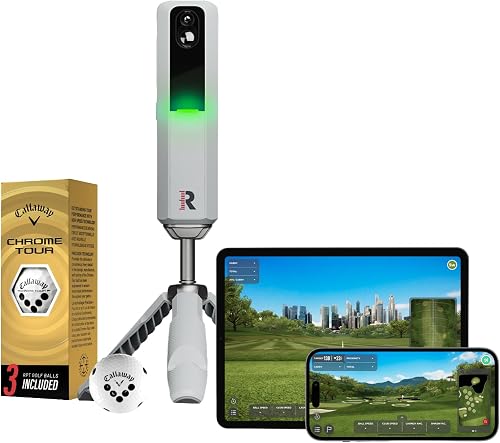
The MLM2PRO pairs with a smartphone over Bluetooth and includes a tripod, carrying case, charging cable and 3 Callaway RPT Chrome Soft X golf balls. The Mevo Gen2 is compatible with iPhone and iPad, lists Android, PC and iOS operating systems, and comes with a carrying case and charging cable and block.
At the range, place the monitor according to its setup instructions and keep the hitting area clear. Use the Mevo Gen2 range-ball setting when practicing with range balls, and allow time to review the first shots before relying on a session’s patterns.
For indoor use, measure the room and check that your hitting net or screen leaves enough clearance for a full swing. Our guide to launch monitors for a home golf simulator covers the broader setup choices.
What common mistakes can make either monitor less useful?
The most common mistake is buying around a headline count instead of a repeatable practice plan. A monitor helps when you know what to measure, have a stable setup and return to the feedback regularly.
Avoid comparing 15 and 18 metrics as if the counts use identical categories. Write down the few measurements or video views you want, then confirm that each model supports them in the app and practice type you plan to use.
Do not assume that advertised course access stays the same after a trial. The MLM2PRO’s 21-day Premium/Core trial is time-limited, while FlightScope says the Mevo Gen2 bundle has no subscription or annual license fees.
Avoid changing several swing mechanics because of one unusual reading. Give yourself a consistent target, setup and club for a practice block, then look for patterns across shots rather than reacting to each miss.
Rapsodo MLM2PRO vs Mevo Gen 2: which one fits your practice?
Pick the Rapsodo MLM2PRO if dual-camera swing review and slow-motion impact views are your priority. Pick the FlightScope Mevo Gen2 if you want 18 practice parameters, video overlays and an included E6 course bundle without recurring license fees.
Skip the MLM2PRO if your decision depends on keeping Premium course features after the trial without a membership. Skip the Mevo Gen2 if its up-to-6-hour battery life or its 8-course E6 bundle does not suit your planned sessions.
The Garmin Approach R10 is another portable option, pairing with a compatible smartphone through Garmin Golf for metrics, swing clips and shot dispersion charts. Compare it in our Garmin R10 vs Mevo Gen 2 guide.
If your choice depends on whether your phone will run the software you want, use our guide to launch monitors for iPhone and Android. Match app compatibility and practice tools to your devices before deciding.
Frequently asked questions
Is the Rapsodo MLM2PRO better than the Mevo Gen 2?
The MLM2PRO is a better fit if you want dual-camera swing capture and slow-motion views of club and ball contact. The Mevo Gen2 offers 18 data parameters, a front-facing camera for video overlays and 8 E6 Connect courses.
Choose by the feedback and simulation tools you expect to use.
Does the Mevo Gen2 need a subscription?
FlightScope says the Mevo Gen2 includes FS Golf, FS Skills, Shot Tracer, Action Video with Data Overlay and an E6 Connect bundle without subscription or annual license fees. The MLM2PRO includes a 21-day Premium/Core trial, so check which features you want after the trial ends.
How many metrics do the MLM2PRO and Mevo Gen2 track?
The MLM2PRO highlights 15 key metrics, including spin rate, spin axis, carry distance, club speed, club path and launch angle. The Mevo Gen2 offers 18 full-swing, chipping and putting data parameters.
The counts describe each brand’s feature set, so compare the specific measurements you need.
Can both monitors record swing video?
Yes. The MLM2PRO offers swing capture from any angle and slow-motion views of club and ball contact.
The Mevo Gen2 has a front-facing camera, records and saves video through FS Golf, and can overlay data on swing video.
Check app and device compatibility for your planned setup.
Which monitor is better for a home simulator?
Either can support home simulator practice, but their included course arrangements differ. The MLM2PRO advertises access to more than 30,000 courses with Premium, while the Mevo Gen2 includes 8 E6 Connect courses.
Compare membership terms, device compatibility and the space required for your setup before choosing.


