7 Best Budget Golf Launch Monitors (October 2026)
The best budget golf launch monitors include the Rapsodo MLM for video practice, the PRGR HS 130-A for ball-free swings, and the Shot Scope LM1 for phone-free viewing.
On this page (9 sections)
- How we chose these budget golf launch monitors
- The best budget golf launch monitors for different practice goals
- How should you choose a budget launch monitor?
- Which features matter in a budget golf launch monitor?
- How do you set up a budget monitor for practice?
- What common mistakes make monitor readings less useful?
- Should you use a budget monitor at home or at the range?
- How should you care for and use a portable monitor?
- Which budget golf launch monitor should you pick?
The Rapsodo MLM is the best budget launch monitor for phone-based shot tracking, with ball and club speed, carry distance, shot shape, video replay and a shot tracer. Choose PRGR HS 130-A for ball-free speed practice, or Shot Scope LM1 if you want to read numbers on the device's screen.
A budget monitor can make a range session more focused without requiring a full simulator setup. The right choice depends on the feedback you will use, where you practice, and whether you want a phone involved.
Start by naming one main job for the monitor. You might want to map carry distances, compare club speed, review video, hear readings without looking down, or save a practice history.
A short list helps you avoid paying attention to features that won't change your routine.
If you are weighing a wider set of features and setups, browse our golf launch monitor comparison chart or read how golf launch monitors differ and how to pick one.
Our picks at a glance
-
1

-
2

-
3
How we chose these budget golf launch monitors
The best budget launch monitor for you should cover a real practice goal with a setup you can repeat. We compared each model's stated metrics, feedback method, phone requirements and training features.
A golfer who wants video may value Rapsodo's replay and tracer. Someone working on speed may prioritize a device that reads swings without a ball, while a player who wants to keep a phone in a bag may favor the LM1's screen.
We also considered whether a monitor fits a range session, a backyard net, or a more focused speed routine. A compact monitor is not automatically a simulator: choose a full setup only if you need its software and room requirements.
These picks cover different kinds of value. Rapsodo gives more context around a shot through video and shot shape.
PRGR keeps operation simple. Shot Scope and Voice Caddie put readings directly in front of you, and TheStack centers its app-led training modes.
Think about what you will do with the numbers after a shot. If you plan to change a club or swing based on a reading, use the same setup and conditions across sessions so comparisons stay useful.
A new number is most helpful when you know what question it answers.
| Product | Best for | Data | Phone support | Use | Our score |
|---|---|---|---|---|---|
| Rapsodo MLM | video practice | Ball speed, club speed, launch angle, carry distance and shot shape | iPhone or iPad with the Rapsodo app | Range, backyard or indoor net | 8.8 |
| PRGR HS 130-A | ball-free swings | Club speed, ball speed, smash factor, carry and total distance | No app required | 8.7 | |
| Shot Scope LM1 | phone-free viewing | Ball speed, club speed, smash factor, carry and total distance | Optional Shot Scope app for session history | 8.4 | |
| Voice Caddie SC200 Plus | spoken feedback | Real-time shot data and stored club statistics | Indoor and outdoor practice | 8.2 | |
| TheStack Radar | guided wedge work | Swing speed, ball speed, estimated carry and smash factor | TheStack App on iOS and Android for speed training | 7.9 | |
| Izzo Swami Launch Master | loft adjustments | Club speed, ball speed, smash factor and carry distance | 7.1 | ||
| Izzo Swami Launch Master Lite | pocket carry | Carry distance, club speed and smash factor | 6.9 |
The best budget golf launch monitors for different practice goals
Rapsodo MLM is the most complete phone-based shot-tracking pick here, while the other monitors focus on direct readings, speed practice or simple distance feedback. Pick the model that fits your most common session, not the one with the longest feature list.
Rapsodo MLM: Best for video practice
- Ball speed, club speed, launch angle and carry distance
- Shot shape and GPS satellite view
- Video replay with shot tracer
- iPhone and iPad only
Pairs radar tracking with an iPhone or iPad for shot data, video replay and shot tracer. Best suited to golfers who want a phone-based practice record.
Pros
- Video replay and shot tracer
- Reports several shot metrics
- Works at a range, backyard or indoor net
Cons
- Requires an iPhone or iPad
- Premium includes simulator courses and game modes
Rapsodo suits golfers who want each shot connected to a video replay. It reports ball speed, club speed, launch angle, carry distance and shot shape, with an on-screen tracer and GPS satellite view to add context.
Use it at the range, in a backyard or with an indoor net. It pairs with an iPhone or iPad, so it is a poor fit if your phone is Android or you don't want to use a phone during practice.
Rapsodo's premium offering includes simulator courses and game modes. Those features may appeal if you want more than shot feedback.
The core reason to choose this model is its combination of shot metrics and video. If you mainly want a no-phone reading, compare it with PRGR HS 130-A and Shot Scope LM1.
PRGR HS 130-A: Best for ball-free swings
- Measures club speed with or without a ball
- Ball speed, smash factor and carry and total distance
- No app, Wi-Fi or Bluetooth required
- Stores 500 past swings
A pocket-sized Doppler radar unit that measures club speed without a ball. Its simple, app-free setup suits golfers focused on speed practice.
Pros
- Measures swings without a ball
- No app or wireless connection needed
- Stores 500 swings
Cons
- Runs on AAA batteries
- Does not offer the Rapsodo's phone video and shot-tracking features
PRGR is the clearest match for golfers who want to measure swing speed without hitting a ball. It also measures ball speed, smash factor, total distance and carry distance, and stores 500 past swings.
There is no app, Wi-Fi or Bluetooth setup to manage. The pocket-sized radar runs on AAA batteries, so pack spares if you have a long practice day or don't want a session cut short by power.
Choose PRGR if your routine is built around speed work, quick readings or straightforward range practice. Skip it if you want video replay or an app-based shot map.
For other compact choices, see our guide to portable golf launch monitors for range practice.
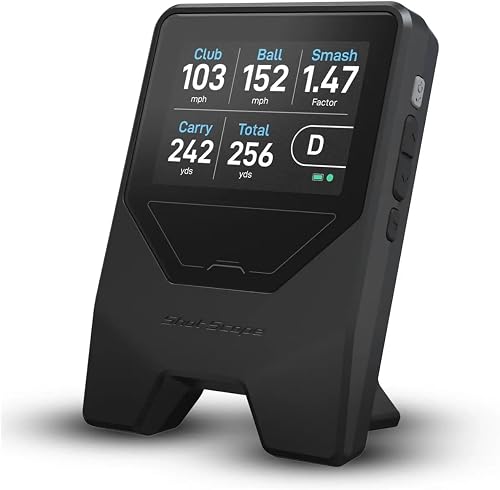
Shot Scope LM1: Best for phone-free viewing
- 3.5 in color screen
- Ball speed, club speed, smash factor and carry and total distance
- Speed training mode
- Free app with lifetime session history and no subscription
Shows data on its own color screen, so you can practice without a phone beside you. It also offers speed training and an app with session history.
Pros
- On-device color screen
- No smartphone required to view range data
- Free app and lifetime session history
Cons
- Spin is not displayed
- App is needed to review session history
Shot Scope LM1 works well if you want to see numbers on the unit and leave your phone aside. Its color screen displays ball speed, club speed, smash factor, carry distance and total distance.
Its On-Course, Practice Range and Speed Training session types let you choose a mode to suit the session. Spin is not displayed, so look elsewhere if spin readings are central to your practice.
The LM1's free app stores lifetime session history without a subscription. It has more than 5 hours of battery life per charge and an IPX3 weather-resistant design intended for rain-ready range use.
Choose it for its direct display and session history, but skip it if you need spin data or video feedback.
Voice Caddie SC200 Plus: Best for spoken feedback

- Doppler radar
- LCD display and voice output
- Swing speed mode without a ball
- Stores shot data and club statistics
Combines an LCD with spoken feedback and includes a swing speed mode for practice without a ball. It can store shot data and club statistics for later reference.
Pros
- Voice output for shot feedback
- Swing speed mode without a ball
- Stores club statistics
Cons
- The product details do not specify all tracked metrics
- No app features are specified
Voice Caddie SC200 Plus gives you an LCD and voice output for real-time feedback. Its swing speed mode works without a ball, making it useful when you want to focus on speed without hitting shots.
The device uses Doppler radar and has adjustable loft angles to simulate different club conditions. It can store shot data and club statistics so you can retrieve average distances by club.
Choose this monitor if spoken feedback will help you keep your attention on the swing instead of the screen. The full set of tracked metrics is not specified.
It is a weaker fit if you need a known list of measurements before buying. For indoor net planning, read how to use a launch monitor when hitting into a net.
TheStack Radar: Best for guided wedge work

- Measures swing speed and ball speed
- Estimates carry distance and smash factor
- Bluetooth connection to TheStack App
- Wedge practice mode and guided putting app access
Connects to TheStack App for speed training and offers app-based wedge sessions. Wedge mode is iOS-only, while speed training supports Apple and Android devices.
Pros
- Speed training works with iOS and Android
- Stack Wedging adds guided wedge sessions on iOS
- Carry distance and smash factor are estimated
Cons
- Wedging is not available on Android
- The wedge mode includes a 1-month free trial
TheStack Radar is for golfers who want app-led speed and wedge practice. It measures swing speed and ball speed, and calculates estimated carry distance and smash factor.
TheStack App connects over Bluetooth. Speed training supports iOS and Android, while Stack Wedging requires an Apple device with iOS 15.0 or later and includes a 1-month free trial.
The product also bundles access to Stack Putting, which offers guided putting sessions on iOS. This is a strong fit if its training modes match your routine and phone.
Skip it if you want a standalone screen or need wedge mode on Android.
Izzo Swami Launch Master: Best for loft adjustments

- Club speed, ball speed, smash factor and carry distance
- LCD display and audible distance readout
- Enter club lofts
- Powered by 4 AA batteries
Displays several swing and ball-striking measures on an LCD and can call out distance. Entering your own club lofts lets you tailor the setup.
Pros
- Audible distance readout
- Measures smash factor and carry distance
- Hard carry case included
Cons
- Uses 4 AA batteries
- Not water resistant
Izzo Swami Launch Master focuses on ball-striking measures shown on an LCD. It measures club speed, ball speed, smash factor and carry distance, and can call out distance after each shot.
You can enter your own club lofts to tailor the setup to your clubs. It runs on 4 AA batteries and comes with a hard carry case.
Choose the full Launch Master if audible distance and adjustable loft input matter more than a smaller shape. It is not water resistant, so keep it dry during outdoor practice.
Skip it if you need app history, shot video or a rain-ready device.
Izzo Swami Launch Master Lite: Best for pocket carry

- Carry distance, club speed and smash factor
- Pocket-sized design
- No complicated setup
- Powered by 4 AA batteries
A pocket-sized option for golfers who want basic distance and speed measures without a complex setup. It comes with a carry case and uses 4 AA batteries.
Pros
- Pocket-sized design
- Simple operation
- Carry case included
Cons
- The stated metrics are more limited than some picks here
- Not water resistant
Launch Master Lite is aimed at golfers who want basic measurements in a pocket-sized package. It reports carry distance, club speed and smash factor, and comes with a carry case.
Its simple operation and 4 AA batteries make it easy to bring along for practice. The stated measurements are narrower than the full Swami Launch Master, which adds ball speed and audible distance.
Pick the Lite if easy carry and basic distance feedback are your priorities. Skip it if you want a broader set of ball-striking measurements or a water-resistant model.
If you're considering a step up in equipment, our guide to golf launch monitors under 1,000 dollars covers a broader range of systems.
How should you choose a budget launch monitor?
Choose by practice goal first, then check phone compatibility, display and setup. This order narrows the field quickly and keeps secondary features from distracting you.
If you want to connect swing video with shot data, Rapsodo MLM is the direct choice. If you want club-speed readings without a ball and no app to manage, choose PRGR; if you want a self-contained screen and a history app for later, choose Shot Scope LM1.
For an indoor routine, decide whether you will hit balls into a net or swing without a ball. Rapsodo supports indoor net use, while PRGR and Voice Caddie have ball-free speed modes.
A monitor cannot replace enough clear space, a stable stance or secure ball containment.
Then consider whether distance or session review matters more. The Izzo Lite covers a narrower set of metrics, while LM1's free app retains session history.
TheStack is worth considering if speed and wedge training through an app are the point of the purchase.
A monitor is only useful when its readings fit your intended decision. Carry distance can help you build a yardage reference.
Club speed can help you track speed sessions, and smash factor can help you compare strike efficiency. Avoid treating a single swing as a verdict on your overall game.
Which features matter in a budget golf launch monitor?
The most useful features are the ones you'll use repeatedly. Pick one main goal, then compare the monitor's readings and feedback style against it.
Is phone video worth it in a budget golf launch monitor?
Phone video is useful when you want to connect a number with a visible swing and ball-flight replay. Rapsodo MLM combines shot metrics with video and an on-screen tracer, but requires an iPhone or iPad.
That setup is less appealing if you prefer to keep your phone away while hitting. Shot Scope's built-in screen or PRGR's app-free operation may suit that routine better.
Consider how you will review a video after each shot. If you want to pause, compare swings and use shot context to guide a change, video can earn its place.
If you only want an immediate distance reading, a simpler display may be easier to use.
Should a budget monitor measure speed without a ball?
Ball-free readings matter if you plan to swing a club or speed stick without hitting a shot. PRGR HS 130-A measures club speed without a ball, Voice Caddie SC200 Plus has a swing speed mode, and TheStack Radar is designed for speed training with clubs and speed sticks.
For yardage practice, prioritize carry distance and ball speed instead. A speed session and a shot-tracking session answer different questions, so one device may not cover both with equal depth.
If you choose a speed mode, keep the swing routine consistent. Use the same club or speed stick and similar swings from session to session, then compare trends instead of focusing on one unusually fast or slow reading.
Do you need an app and saved session history?
An app can help you review sessions after practice, but it brings phone and compatibility requirements. Rapsodo uses an iPhone or iPad app, while TheStack connects to its app for speed training and offers iOS-only wedge practice.
Shot Scope LM1 can display range data without a phone and also offers a free app with lifetime session history and no subscription. PRGR is the simplest match if you want quick readings without an app or wireless connection.
Before buying, check which features require the app and which work on the device itself. For more on phone requirements, see which launch monitors work with iPhone and Android.
Is carry distance enough for your practice?
Carry distance is a useful starting point for building a yardage reference, but it won't answer every question about a shot. Some picks here also provide ball speed, club speed, smash factor or shot shape, while TheStack calculates estimated carry.
Decide which readings you need to make a change in practice. If you are comparing clubs, consistent carry readings may be more useful than extra features you won't review.
If you are working on contact, ball speed and smash factor may be more relevant.
How do you set up a budget monitor for practice?
A repeatable setup makes comparisons more useful. Start with the monitor's instructions, place it as directed for your model, and keep its position consistent through the session.
For Shot Scope LM1, the setup guidance says to select a session type and place it about a driver's length behind the ball. It does not require calibration or setting adjustments.
For other models, follow their own instructions rather than assuming the same placement works across every monitor.
Set up on a stable surface with a clear view of the ball and a safe hitting area. At a range, avoid putting the unit where another golfer or a club could strike it.
Indoors, check the net position, ceiling clearance and space around your swing before hitting.
Take a few practice shots to settle into the same routine. Keep the monitor, ball position and target line fixed, and use the same club when building a distance reference.
If you move the monitor or change the session type, treat the new readings as a separate group.
For devices that use a phone, confirm the app and connection before you start hitting. Rapsodo needs an iPhone or iPad, and TheStack uses Bluetooth to connect to its app.
Charge or bring the power source your monitor needs, such as AAA or AA batteries for the models that use them.
If you use a unit outdoors, protect it from conditions beyond its stated resistance. The Izzo models are not water resistant.
Shot Scope LM1 has an IPX3 rain-ready design, but that does not make it a reason to leave equipment exposed when the session ends.
What common mistakes make monitor readings less useful?
The most common mistake is changing several setup details at once. If your distance numbers shift, keep the club, ball position and monitor placement consistent before deciding that your swing changed.
Another mistake is comparing different kinds of measurements as if they mean the same thing. Carry and total distance are separate figures on some monitors; TheStack's carry is estimated.
Check which reading you are using before changing a club choice or practice target.
Don't choose a monitor based on a feature you won't use. Video and shot tracing are valuable for golfers who will review them, but they add little if you only want a quick speed reading.
Similarly, an app's session history matters only if you intend to look back at practice.
Phone compatibility is easy to overlook. Rapsodo requires iPhone or iPad, and TheStack's wedge mode is iOS-only even though speed training supports Android.
Confirm your device and the specific feature you want before choosing either.
Finally, don't expect a budget monitor to replace a complete simulator setup. If you want virtual courses, a large screen and a dedicated hitting area, compare the additional equipment and software needs in our guide to launch monitors for a home golf simulator.
Should you use a budget monitor at home or at the range?
A range is the easiest fit if your main goal is to compare shots in a normal hitting area. You can focus on carry, ball speed or speed training without having to build an indoor space around the monitor.
At home, first choose between hitting a ball into a net and practicing without a ball. Rapsodo is described for use with an indoor net, while PRGR and Voice Caddie have ball-free speed modes.
Give your swing enough safe room and use equipment that contains the shots you hit.
A home net session can be useful for repeatable practice, but it may not provide the same view of full ball flight as a range. A phone-based tracer or monitor reading gives feedback in its own way, so decide whether that is enough for the specific work you want to do.
For a simulator room, the monitor is only one part of the setup. Our guide to home simulator launch monitors covers the broader choices, while our guide to hitting into a net focuses on the practice arrangement.
How should you care for and use a portable monitor?
Keep the unit and its accessories together so setup stays simple. The Rapsodo includes a carrying case and charging cord, PRGR uses AAA batteries, and the Izzo models include a case and use AA batteries.
After practice, switch the device off and store it in its case or another protected spot. Keep screens, sensors and battery compartments free of loose dirt, and follow the care instructions that come with the specific unit.
Check power before leaving for a session. The LM1 is rechargeable over USB-C and provides more than 5 hours per charge.
Battery-powered units need the correct cells. A quick check avoids interrupting a practice plan to find a power source.
Protect the monitor from rain according to its stated weather resistance. The Izzo models are not water resistant, and outdoor use does not mean every device can stay in wet conditions.
If you're unsure about weather, pack the unit away before it gets exposed.
Which budget golf launch monitor should you pick?
Pick Rapsodo MLM if you want phone video, shot shape and shot data together, and you use an iPhone or iPad. Choose PRGR HS 130-A for app-free readings and ball-free speed work, or Shot Scope LM1 for a built-in color screen and session history.
Choose Voice Caddie SC200 Plus if you want spoken feedback and a speed mode without a ball. TheStack Radar fits app-led speed and wedge sessions, especially when its iOS requirement for wedge practice works for you.
For straightforward distance and speed measures, choose the full Izzo Launch Master for ball speed and audible distance, or the Lite for pocket-sized carry. The best budget launch monitor is the one that fits your actual session, gives you the readings you need and is simple enough to set up every time.
Our top 3 picks at a glance
-
1
-
2
-
3
Frequently asked questions
What should a budget golf launch monitor measure?
Choose metrics that match your practice goal. Ball speed and carry distance help you review shots and yardages, while club speed and smash factor can help you compare swings and contact.
If speed work without a ball matters, confirm that the monitor has a ball-free mode.
For later review, check whether an app or saved session history is available.
Do budget launch monitors need a phone?
No. PRGR HS 130-A works without an app, Wi-Fi or Bluetooth, and Shot Scope LM1 displays data on its own screen.
Rapsodo MLM needs an iPhone or iPad and its app.
TheStack Radar connects to an app for speed training, and its wedge mode requires iOS.
Can you use a budget launch monitor indoors?
Some models are described for indoor practice, including Rapsodo MLM with an indoor net and Voice Caddie SC200 Plus. PRGR and SC200 Plus also have ball-free speed practice modes.
Make room for a safe swing and secure ball containment before hitting indoors.
Check the setup guidance for your chosen monitor and practice space.
Which budget launch monitor works without a golf ball?
PRGR HS 130-A measures club speed without a ball, and Voice Caddie SC200 Plus has a swing speed mode for ball-free practice. TheStack Radar is designed for speed training with clubs and speed sticks.
Choose based on whether you want a simple reading or app-based practice sessions.


