Garmin Approach R50 Review: Worth It? (November 2026)
The Garmin Approach R50 is the best launch monitor here for practice with its own screen, and it's the pick if you want simulator golf without connecting a phone. Buy the cheaper R10 if a phone screen and a small budget matter more.
On this page (9 sections)
- The Garmin Approach R50 at a glance
- Who should buy the Garmin Approach R50?
- The specs that matter in daily use
- Setting up the Garmin Approach R50
- Using the screen and the simulator modes
- Care and upkeep
- The trade-offs of the Garmin Approach R50
- Alternatives worth comparing
- Verdict: is the Garmin Approach R50 worth it?
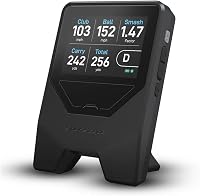
The Garmin Approach R50 is the best launch monitor in this review if you want a screen built into the unit. Its 10-inch touchscreen shows your metrics, impact videos and virtual rounds without a phone, and the three-camera system tracks spin rate and spin axis indoors and outside.
This garmin approach r50 launch monitor review covers what the screen costs you and when the cheaper R10 makes more sense.
It's a premium device aimed at golfers who practice seriously and want simulator golf at home or at the range. The main question is whether the built-in screen and camera system are worth it over a phone-based monitor.
The Garmin Approach R50 at a glance
The R50 is a standalone launch monitor with a 10-inch color touchscreen. Garmin built the display into the unit, so you read numbers and pick courses without opening an app on your phone.
Garmin Approach R50: Best for screen-only practice and sim golf

- 10-inch built-in color touchscreen
- Three-camera system
- Ball speed, launch angle, face to path, spin rate and axis
- Up to 4 hours battery life
- Carrying case included
A premium launch monitor with its own 10-inch touchscreen. It tracks ball and club data with three cameras, plays Home Tee Hero virtual rounds and runs up to 4 hours on a charge.
Pros
- Built-in screen means no phone or tablet needed
- Three cameras track spin rate and spin axis indoors and outside
- High-speed impact videos for visual feedback
- HDMI output for a monitor or projector
- Carrying case and 4-hour battery
Cons
- Premium price
- Home Tee Hero virtual rounds need a Garmin Golf membership
- Heavy next to a phone-based monitor
Three cameras feed the data. Garmin says they track ball speed, launch angle, face to path, spin rate and spin axis, plus more than 15 total ball and club metrics.
The screen also plays high-speed impact videos so you can see how you struck each shot.
A built-in barometer measures atmospheric pressure. Garmin uses that to adjust carry distances for your location, which matters if you practice at altitude or travel between courses.
The kit also includes a carrying case, an AC adapter and power cord, and the tracking stickers the face-to-path metric needs. Bluetooth and Wi-Fi handle pairing and updates.
Who should buy the Garmin Approach R50?
Buy the R50 if you want simulator golf and practice data on one screen, without a phone or tablet in the mix. It suits a golfer who hits balls at home into a net or at the range and wants instant feedback plus virtual rounds.
It's also the pick for anyone who likes reviewing swing video. The high-speed impact footage gives you a visual record of each strike next to the numbers.
If you connect a monitor or projector by HDMI, the R50 becomes a full simulator setup for a garage or spare room.
The touchscreen also makes it a good fit for a shared bay. Up to four players can take on a Home Tee Hero round, and each can step up and read the screen without passing a phone around.
Skip it if you mostly want basic distance and speed numbers on a budget. The Garmin Approach R10 tracks those for a lower price and has longer battery life.
Skip it too if you'd rather not pay for a Garmin Golf membership to play virtual courses.
The specs that matter in daily use
The 10-inch touchscreen is the feature you'll notice every session. It's bright and color, so you can read ball speed and launch angle at a glance without squinting at a phone in the sun.
The touch controls also mean you can change modes without digging out a device.
Battery life runs up to 4 hours. That's enough for a range session or a nine-hole virtual round, but it's shorter than the R10's 10 hours.
Plan to charge it after longer days.
The R50 weighs 9 pounds and measures 10.6 by 7.5 by 16.5 inches. It's a unit you set down and leave in place rather than pocket.
A carrying case comes in the box for moving it between home and the range.
The barometer is a quiet but useful spec. Carry distances change with air pressure, and Garmin adjusts for your location so the numbers you see match where you're hitting.
The spec sheet also lists every club as compatible, so you can work through the whole bag without swapping hardware. The 2024 model year means the software and course library are current.
Setting up the Garmin Approach R50
Setup starts with placing the unit at the right distance behind the ball and giving it a clear view. The three cameras need an unobstructed line to the ball and club, so keep bags and stands out of the frame.
Set it on level ground for the best readings.
Power it on and let the touchscreen boot. Pick a practice mode or a virtual round from the display.
For face to path, put the included tracking sticker on the club you're using; Garmin says the sticker is required for that metric.
If you want a bigger picture, connect a monitor or projector by HDMI. That turns the R50 into a simulator screen for a garage or indoor bay.
The unit also connects over Bluetooth and Wi-Fi for app and software updates. Because the screen is the control surface, you set up sessions directly on the unit rather than in an app.
Charge it fully before the first session. Four hours is the ceiling, so keep the AC adapter handy for longer days at the range.
The carrying case makes it easy to stow the unit between sessions, and the mount type lets you fix it in place if it lives in one bay.
Using the screen and the simulator modes
The built-in screen is the reason to choose the R50 over a phone-based monitor. Training mode tracks stats for each club and shows a shot dispersion chart based on an advanced ball flight model.
That makes it easy to see which clubs spray and which stay tight.
Virtual rounds run through Home Tee Hero with an active Garmin Golf membership. Garmin says there are more than 43,000 courses, putting, and support for up to four players.
A weekly tournament posts scores to a global leaderboard, all visible on the R50 display. Putting is part of the virtual round, so you can practice the full game, not just full swings.
Impact videos give you a second layer of feedback. Watch the high-speed clip beside the numbers to see if a slice comes from face angle or path.
For a closer look at screen-based monitors, our guide to the launch monitor with screen choice explains the trade-offs.
Training mode in more detail
Training mode is where the camera data earns its keep. It groups stats by club, so you can see whether your driver or your wedges are the weak link, and the dispersion chart shows how far your misses scatter from the target line.
The advanced ball flight model estimates where each shot would land, so a session into a net still tells you something about real-world carry. Review the chart after each block of shots and you get a clear picture of consistency without guessing.
Care and upkeep
Treat the R50 like any precision electronic device: keep it dry, store it in the included case and avoid leaving it in a hot car. The case protects the screen and cameras when you move it between home and the range.
Wipe the camera lenses and screen with a soft cloth. Dust and fingerprints on the lenses can blur the video and affect how well the cameras read the ball.
Keep the tracking stickers clean and replace them when they wear.
Charge the battery after each session rather than letting it run flat. If you store the unit for weeks, charge it partway first.
Avoid dropping it, since a knock can move the cameras out of alignment.
The trade-offs of the Garmin Approach R50
The biggest trade-off is the premium price for the screen and camera system. You're paying for the built-in display and the simulator experience, not just the sensor.
Golfers who only want speed and distance can spend less.
Home Tee Hero virtual rounds need an active Garmin Golf membership. The hardware works without it for practice and impact video, but the course library and tournaments sit behind the subscription.
At 9 pounds it's heavier than a pocket monitor, and 4 hours of battery is shorter than the R10's 10 hours. The three cameras and big screen draw more power.
Plan for a charge on longer days.
Finally, the R50 asks for a clear camera view. A crowded range bay or a net setup with clubs in the frame can get in the way of clean readings.
The tracking sticker is also one more thing to remember for face-to-path data.
Alternatives worth comparing
The R50 is the premium pick, but two cheaper Garmin models and a phone-based rival cover different budgets. Each has a named buyer below.
Garmin Approach R10
The Garmin Approach R10 is the best value for phone-based practice. It tracks more than a dozen metrics including club head speed, ball speed, swing tempo, spin and launch angle, and pairs with the Garmin Golf app on your phone.
Battery life runs up to 10 hours, and Garmin lists club head speed accuracy within 3 mph and ball speed within 1 mph.
It records video clips with the metrics of each swing, so you get feedback without the R50's built-in screen. Buy it if you want Garmin's ecosystem at a lower price and don't mind using your phone.
Read our flightscope mevo gen2 launch monitor review if you're comparing radar options too.
Rapsodo MLM
The Rapsodo MLM is the best for iPhone and iPad users who want video feedback. It pairs with the free Rapsodo app and returns ball speed, club speed, launch angle, carry distance and shot shape on every shot.
Video replay with a shot tracer shows your true ball flight.
It's iOS only, so Android users should look elsewhere. The MLM suits a golfer who wants to see the swing on video and track carry distances.
Compare it with another phone option in our shot scope lm1 review and this prgr launch monitor vs shot scope lm1 breakdown.
Verdict: is the Garmin Approach R50 worth it?
The Garmin Approach R50 is worth it if you want a self-contained launch monitor with a big screen and simulator golf. The 10-inch touchscreen, three-camera tracking and Home Tee Hero courses make it a complete practice and play station.
No phone is needed, and the HDMI output turns it into a projector setup.
Buy the R10 instead if you want Garmin data for less and don't need a built-in screen. Pick the Rapsodo MLM if you're on iPhone or iPad and want video replay with a shot tracer.
Choose the R50 when the screen and simulator rounds are the point of the purchase.
Our score weighs specs, features and buyer feedback against what you're shopping for. For the R50, the screen, camera system and simulator access carry the score, while the premium price and 4-hour battery hold it back.
The R50 earns its place as the top pick here for screen-first practice. If you set up a garage bay or want virtual rounds without a phone, this is the model to shortlist.
Check the membership terms before you buy so you know what the course library costs over a year.
Frequently asked questions
Does the Garmin Approach R50 need a phone to work?
No. The Approach R50 runs on its own 10-inch color touchscreen, so you can see metrics and start sessions without pairing a phone.
Garmin says the Home Tee Hero virtual rounds need an active Garmin Golf membership, so the subscription is separate from the hardware.
What metrics does the Garmin Approach R50 track?
Garmin says the three-camera system tracks more than 15 ball and club metrics, including ball speed, launch angle, face to path, spin rate and spin axis. Face to path needs the included tracking sticker on the club.
Spin insights work both indoors and outside.
How long does the Garmin Approach R50 battery last?
Garmin rates the Approach R50 at up to 4 hours of battery life. That covers a typical range session or a nine-hole virtual round with room to spare.
Charge it before you head out, since simulator rounds and screen use drain it faster than short practice blocks.
Can you play virtual golf on the Garmin Approach R50?
Yes, with an active Garmin Golf membership. Garmin says Home Tee Hero offers more than 43,000 courses, putting, and rounds for up to four players.
The courses and the weekly leaderboard tournament all show on the R50's built-in display or on a projector through HDMI.