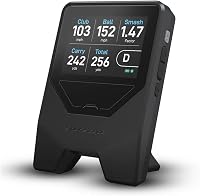
FlightScope Mevo Gen2 Review: Worth It? (November 2026)
The FlightScope Mevo Gen2 is a good buy for golfers who want swing data and simulated courses in one portable unit. It tracks 18 data points, bundles 8 E6 courses with no subscription and works indoors or outdoors. Pick the Rapsodo MLM if you only need iPhone-based feedback without the simulator bundle.
On this page (8 sections)
The FlightScope Mevo Gen2 is a strong pick for golfers who want data and simulated play in one unit. It tracks 18 swing, chipping and putting data points, includes 8 E6 Connect courses with no subscription and records your swing on a built-in camera.
The main catch is the price tier: you pay for the simulator bundle. This flightscope mevo gen2 launch monitor review covers what the data actually gives you, how setup works in a home net or at the range, and which buyers should pick a cheaper unit instead.
The FlightScope Mevo Gen2 at a glance
The Mevo Gen2 is a portable launch monitor and simulator that uses FlightScope's Fusion Tracking system. That combines 3D Doppler radar with high-speed image processing, and FlightScope says the two together give accurate data indoors and outdoors.
It's about 1.1 lb and small enough to carry in a bag. The frame measures 5.5 in long, 1 in wide and 6.88 in high, so it stands low behind the ball.
The box includes a carrying case, charging cable and block, aluminum stickers and a quick start guide.
FlightScope Mevo Gen2: Best for data-hungry practice

- 18 swing data parameters
- 8 E6 Connect courses included
- Front facing camera
- 6-hour battery
A portable launch monitor and simulator for practice indoors or at the range. The included E6 courses and swing camera make it a full practice package.
Pros
- 18 swing, chipping and putting data points
- 8 E6 Connect courses with no subscription
- Front facing camera records swings with data overlay
- Range ball setting for driving range sessions
- Runs up to 6 hours on a charge
Cons
- Score lower than the Rapsodo MLM and PRGR HS 130-A here
- Runs sessions through an app on your iPhone or iPad
- Simulator and camera features cost more than a data-only unit
The headline feature is the E6 Connect bundle. You get 8 courses, including Kiawah Ocean Course and Torrey Pines, with no subscriptions or annual fees.
FlightScope also includes the FS Golf and FS Skills apps, Shot Tracer and action video with data overlay in that lifetime bundle. Lifetime ownership matters because the courses and apps stay yours without a renewal.
For a buyer who wants both range numbers and a home simulator, that package is the reason to choose this unit. The 18 parameters are split across full swing, chipping and putting, so the same device covers a driver session and a putting session without swapping gear.
Who the Mevo Gen2 suits
This launch monitor suits the golfer who practices at home and at the range and wants one device for both. If you hit into a net in the backyard and also take sessions to the driving range, the indoor and outdoor tracking plus the range ball setting covers both.
It also fits players who learn from video. The front facing camera records, clips and saves each swing in the FS Golf app, and the app overlays clubhead speed, ball speed, carry distance and other data onto the video.
For a player working through a swing change, seeing the number next to the motion is more useful than a number alone. You can connect up to three mobile devices plus the internal camera for a multi-angle coaching view.
A coach can watch from several angles at once, and the voiceover tool lets them talk through the swing on the video itself. Skip it if you only want swing speed or basic ball data.
The simulator bundle is what you're paying for, and a data-only unit covers simple practice for less. If you don't use an iPhone or iPad, verify Android or PC app support before buying, since the app experience is built around those devices.
The specs that matter in daily use
The 18 data parameters are the core of the Mevo Gen2, and they cover more than most portable monitors. FlightScope lists full swing, chipping and putting data, so you can work on short game and putting as well as driver numbers.
That's a wider practice range than a unit that only tracks ball speed and carry. The 6-hour battery is generous for a portable unit, and a long range session or a simulated round fits within one charge.
FlightScope lists Wi-Fi connectivity, so the unit talks to your iPhone or iPad over a network. The 8 E6 courses are the practical draw for home use, giving you real course layouts to play indoors.
Because there's no subscription, the courses are yours after you buy. FlightScope pairs the courses with a GPS overview and Shot Tracer, so you can see the hole layout and the ball flight in the same session.
FlightScope lists the display type as a touch screen and the control method as app or touch. In practice you'll run sessions through the FS Golf app on your phone or tablet.
Our guide to built-in screen vs phone app launch monitors explains when a unit with its own screen makes more sense.
Setting up the Mevo Gen2 at home or the range
Setup is straightforward: place the unit on the ground behind the ball, connect to your iPhone or iPad over Wi-Fi and open the FS Golf app. The carrying case, charging cable and block and quick start guide are all in the box.
For indoor use, give yourself enough room between the ball and the net for the radar to read the full flight. FlightScope's Fusion Tracking combines radar with image processing, so keep the unit stable and clear of obstructions.
The front facing camera needs a clean line of sight to the ball to record swings and overlay data. At the range, switch on the range ball setting so the data stays accurate with range balls.
That's a real advantage over units that only read premium balls well. The camera records and clips each swing automatically, so you can review video after the session without editing.
The E6 courses run through the app, so a stable Wi-Fi connection matters for simulated rounds. Plan your session around the app: set up the device, connect, then start a swing session or load a course.
FlightScope also lists the Mevo Gen2 as working with iOS, Android and PC, so the device you already own may cover it, though the core app experience is iOS-first.
Camera, video and coaching use
The front facing camera and multi-cam support set the Mevo Gen2 apart for coaching and self-review. FlightScope's FS Golf software records, clips and saves every video, then overlays data so you see the numbers on the swing itself.
You can connect up to three mobile devices plus the internal camera for multiple angles. Users can draw lines and circles on the video and record a voiceover with comments.
That makes it useful for a coach reviewing a student's swing or for a player building a video library. Shot Tracer renders the full ball flight from launch to landing in 3D within the recording, so you see the path rather than just the numbers.
FlightScope includes step-by-step instructions for setting up Tracer on iOS devices inside the FS Golf app. For a golfer working on a swing change, the combination of data and video is the practical benefit.
You can see clubhead speed and carry next to the swing that produced them. If you mainly want ball flight feedback without video, a simpler unit does the job.
The trade-offs to know before buying
The biggest trade-off is price tier and device dependence. The Mevo Gen2 sits above budget launch monitors because of the E6 bundle, camera and 18 data points.
If you don't plan to use the simulator or the video, you're paying for features you won't touch. It also runs sessions through an app on an iPhone or iPad, and FlightScope lists Android and PC as compatible operating systems too.
Check your device before you buy if you're on Android. The simulator bundle is tied to E6 Connect, so course choices are fixed: FlightScope includes 8 courses, and you don't pick and choose from a wider library in the included bundle.
That's fine for practice, but it's not an open platform for adding courses later. Finally, the score here reflects the fit for the keyword's searcher.
As a full simulator and practice package it's capable, but buyers who want simple data get better value from a cheaper unit. The comparison below explains that.
Alternatives worth a look
If the Mevo Gen2's bundle doesn't match how you practice, two alternatives cover the same needs differently. Both cost less and focus on the basics.
Rapsodo MLM
The Rapsodo MLM is the simpler iPhone-based option. It pairs with the free Rapsodo app on iPhone or iPad and returns ball speed, club speed, launch angle, carry distance and shot shape on every shot.
Video replay with a shot tracer shows your true ball flight. It maps shot dispersion and performance trends with GPS satellite view, so you can see where your misses land over a session.
It weighs about 0.4 kg and packs into its carrying case, so it's easy to take to the range. The trade-off is device dependence too, since it's iOS only and premium features require payment for simulator courses and game modes.
For a buyer who wants basic shot data and video without a full simulator, it's the lower-cost path. Our Rapsodo vs FlightScope comparison covers how the Garmin R10 stacks up against the Mevo Gen 2 if you're weighing both.
PRGR HS 130-A
The PRGR HS 130-A is the budget option for speed and ball data. It uses Doppler radar to track clubhead speed with or without a ball, ball speed, smash factor and total and carry distance.
It runs on AAA batteries with no Wi-Fi, Bluetooth or app. PRGR lists a measuring range of 135 to 270 yards and keeps 500 past swings in memory.
It's pocket-sized and keeps 500 swings in memory. For speed training it measures clubhead speed without hitting a ball, which makes it ideal for swing speed work.
It also works for baseball, tennis, soccer and hockey, so it earns its keep beyond golf. The catch is that it's data only: no simulated courses, no camera and no video overlay.
If you want to practice speed and distances cheaply, it's the pick. If you want the full simulator experience, stick with the Mevo Gen2.
Verdict: should you buy the FlightScope Mevo Gen2?
Buy the FlightScope Mevo Gen2 if you want a practice and simulator package in one portable unit. The 18 data points cover full swing, chipping and putting, the front facing camera records swings with data overlay, and the 8 E6 courses come with no subscription.
The 6-hour battery and 1.1 lb body make it easy to move between the net and the range. Choose the Rapsodo MLM if you want basic shot data and video on an iPhone without paying for simulator courses.
Pick the PRGR HS 130-A if swing speed and ball data are all you need and you'd rather skip apps and Wi-Fi. If you're still comparing units, our Garmin R10 vs FlightScope Mevo Gen 2 breakdown and Shot Scope LM1 review help you weigh the radar options.
The flightscope mevo gen2 launch monitor review verdict: it earns its place for the golfer who will use the simulator and camera. For everyone else, a cheaper data-first unit is the smarter buy.
Frequently asked questions
Is the FlightScope Mevo Gen2 a launch monitor and simulator?
Yes. It tracks 18 swing data points and includes 8 E6 Connect courses with no subscription fees.
You can use it for range practice or as a home simulator, though it runs sessions through an app on your iPhone or iPad.
How long does the FlightScope Mevo Gen2 battery last?
FlightScope says the Mevo Gen2 runs for up to 6 hours on one charge. That covers a long range session or a full round on a simulated course, though heavy camera use and video recording may shorten it.
Does the FlightScope Mevo Gen2 work indoors?
Yes. FlightScope designs it for indoor and outdoor use, so you can practice into a net at home or take it to the driving range.
The radar and image tracking work in both settings.
What do I need to use the FlightScope Mevo Gen2?
You need an iPhone or iPad with the FS Golf app. The unit connects to the app over Wi-Fi, and FlightScope lists Android and PC as compatible operating systems too.
The app experience is built around iOS.
Is the FlightScope Mevo Gen2 worth it over a cheaper launch monitor?
Choose it if you want simulated courses, a swing camera and detailed putting and chipping data. For swing speed and ball data alone, the PRGR HS 130-A covers the basics for much less.