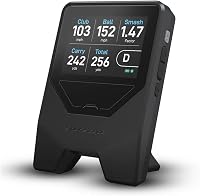
Bushnell Launch Pro vs LPI: What Is the Difference? (November 2026)
The Bushnell Launch Pro is the stronger pick for most buyers. It's a camera-based monitor built for accurate ball and club data indoors, while the LPI follows the cheaper radar-plus-app path and trades some measurement detail for a lower entry point.
On this page (8 sections)
- Bushnell Launch Pro vs LPI: the quick verdict
- The two monitors side by side
- Which one gives better accuracy indoors?
- Which is easier to set up and live with?
- What does each one cost to own over time?
- Who should buy the Bushnell Launch Pro?
- Who should buy the LPI?
- Which launch monitor should most golfers choose?
The Bushnell Launch Pro is the stronger pick for most buyers. It's a camera-based monitor built for accurate ball and club data indoors, while the LPI follows the cheaper radar-plus-app path and trades some measurement detail for a lower entry point.
The Bushnell launch pro vs lpi question comes up because both monitors promise useful practice numbers without a commercial fitting studio. They get there in different ways.
This comparison covers how each one measures, what you'll need in the room, and which buyer should choose which.

 Best for course yardages and tunes
MILESEEY GeneSonic Pro Golf GPS Speaker
Bushnell Launch Pro vs LPI: the quick verdict
Pick the Bushnell Launch Pro if you want detailed ball and club data and a path into simulation. Pick the LPI if you want simpler practice feedback and a lighter setup at home.
The Launch Pro sits in the camera-based camp. Cameras capture the club and ball at impact, which gives you a fuller picture than a radar-only reading.
That fuller picture includes the club numbers a coach would use, such as face angle and path.
The LPI sits in the radar-plus-app camp. It's the more affordable way into launch monitor practice, with the app doing more of the heavy lifting.
The app holds the session history and turns raw readings into something you can review after the session.
Neither is a toy. The difference is depth: the Launch Pro gives you more to work with, and the LPI gives you enough to practice with less fuss.
One is a data tool, the other is a feedback tool.
The split matters most when you know what you want to change. A golfer working on strike and start line needs club numbers.
A golfer working on carry gapping needs a repeatable distance read. That single goal often settles the choice before price does.
If you only want on-course yardages, skip both and read our Shot Scope LM1 launch monitor review for a different angle on portable practice gear.
The two monitors side by side
The table below sums up the practical split. The Launch Pro is the camera unit with deeper data and simulation links, and the LPI is the app-led radar option.
| Product | Best for | Magnification | Range | Accuracy | Our score |
|---|---|---|---|---|---|
| Callaway 300 Pro Golf Laser Rangefinder | on-course yardages | 6x | 5-1000 yards | +/- 1 yard | 9.7 |
| MILESEEY GeneSonic Pro Golf GPS Speaker | course yardages and tunes | 9.5 |
The Launch Pro's measurement comes from cameras, so it reads the club and ball directly at impact. That's the setup fitting studios use when they want club path and face detail.
The cameras look at the moment of impact, not at the whole flight.
The LPI measures with radar. Radar tracks the ball through flight and infers swing numbers, which keeps the hardware simpler and the price lower.
The ball is the sensor's main subject, and the swing numbers are worked out from what the ball did.
Both give you carry and ball speed. The Launch Pro adds club data that radar struggles to match indoors in a short hitting bay.
What each monitor measures
The Launch Pro is built around camera tracking. Expect ball speed, launch angle, carry and club data such as path and face angle, which is what makes it useful for swing changes.
Face angle at impact is the number that explains a lot of misses.
The LPI's radar core reports ball flight numbers. It's enough to see whether your carry is consistent and whether your shots curve.
Curvature and carry are the two things most range golfers want to watch.
The sensor type also shapes how much the room influences the reading. A camera needs to see impact clearly and nothing more, so the numbers stay stable in a short bay.
Radar wants flight time, so the same bay length gives it less to work with.
For most home practice, the LPI's numbers cover the basics. The Launch Pro earns its place when you want to know why the ball went where it did.
That "why" is the part radar leaves out in a short bay.
Which one gives better accuracy indoors?
The Bushnell Launch Pro wins on indoor accuracy because cameras measure the club and ball directly. Radar needs more flight distance to read the ball well.
A short indoor bay is the hard case for any launch monitor. Radar works best when it can watch the ball travel, so a net a few feet away limits what it can see.
The shorter the flight, the less the radar has to work with.
Cameras don't need that flight distance. They capture impact and the first moments of flight, which is why camera units are the usual choice for a garage or sim room.
Impact happens in the same spot every time, so the camera's job stays the same.
The LPI still gives usable readings, but its radar design means the room matters more. A longer indoor run helps it settle.
If you can back up the hitting area, radar gets a better look at the ball.
The error shows up in different places. Radar in a short bay tends to blur the club side of the picture, so path and face angle get less reliable first.
Camera readings hold up because the club is right in front of the lens at impact.
If your practice space is tight, the Launch Pro's camera approach is the safer bet. Our guide to launch monitors with a built-in screen versus phone apps explains why display choices matter as much as the sensor.
Which is easier to set up and live with?
The LPI is the easier monitor to set up and run day to day. The Launch Pro asks more of your room and your software.
The LPI leans on its companion app. You pair the monitor, place it at the ball and start hitting, which suits a golfer who wants to practice without a project.
The app is the control panel and the record book in one.
The Launch Pro needs a settled setup. Camera units want a consistent ball position, decent lighting and enough room for the cameras to see impact.
Those three things do not move from session to session.
That's not a flaw. It's the trade you make for better data.
A permanent indoor bay is where the Launch Pro makes sense. Once the bay is dialed in, the routine becomes quick.
Space and lighting for a camera unit
Plan the hitting area before you buy. The Launch Pro needs clear room behind and in front of the ball for its cameras to work.
A net, a screen and a mat all sit inside that footprint.
Indoor lighting matters with camera tracking. Avoid a bay where harsh light falls directly across the ball position.
Camera sensors want steady light, not glare. Uneven light across impact is the usual reason a camera unit reads oddly.
The LPI is more forgiving about placement. Its radar core needs a clear line to the ball's flight, so keep the net and clutter out of that path.
A cart-style setup or a simple net both work as long as the path is clear.
Daily routine and data review
The LPI's routine is short. Power it on, pair the app and hit.
Data lives in the app, so reviewing a session means opening the phone rather than the monitor.
The Launch Pro's routine is longer to build but steady once it's set. The reward is data you can act on after the session, including club numbers tied to each shot.
The review habits differ too. LPI sessions are easy to scan shot by shot, which suits a golfer checking consistency.
Launch Pro sessions reward a closer look, because the club numbers explain the shape of a shot, not just the result.
For a golfer who practices twice a week, the LPI's low-friction loop is a real advantage. For a golfer chasing a swing change, the Launch Pro's data review is the point.
What does each one cost to own over time?
The Launch Pro has the higher entry cost and ties you into its software ecosystem. The LPI keeps the hardware and app path simpler.
Neither is a budget buy. The Launch Pro's camera hardware and simulation links put it in the premium tier for home practice gear.
Camera units cost more to build, and the software adds to the total.
The LPI sits lower. It's aimed at golfers who want launch monitor feedback without a studio-sized spend.
Radar hardware is simpler, and the app carries more of the product.
Software is where ownership costs hide. The Launch Pro's data and simulation features run through Foresight's platform, so read what each plan includes.
Simulation and course play sit in that same platform.
The LPI's basic numbers come through its app. Check what the free tier covers and what needs an upgrade before you commit.
The app is the gate to the deeper features.
One more thing to weigh is how long each setup stays useful. The LPI's app is where its value grows or stalls.
The Launch Pro's platform adds courses and practice modes over time, which is part of what you pay for. Add up the hardware and the plan you actually need before you compare totals.
If simulation is the goal, weigh the Launch Pro's software path against the total you'd spend. Our Bushnell Launch Pro vs Foresight GC3S comparison walks through how the sibling models differ in exactly this area.
Who should buy the Bushnell Launch Pro?
Buy the Bushnell Launch Pro if you're serious about indoor practice and want club data plus a simulation path. It suits a golfer building a permanent bay at home or in a garage.
The camera tracking gives you the numbers to work on a swing change, not just the result. That's the difference between seeing your slice and seeing why it slices.
Face angle and path turn a miss into a fix.
It also fits a buyer who wants the Foresight ecosystem. Simulation, course play and data review all live in that platform.
One account ties the practice bay to the virtual course.
Skip it if you practice in a cramped, dimly lit space or you only want a quick carry number. The Launch Pro rewards a proper setup.
Give it room and steady light and it gives back data.
Who should buy the LPI?
Buy the LPI if you want launch monitor practice with a lighter setup and a lower entry cost. It's the sensible first monitor for a golfer who mainly wants consistent carry and flight feedback.
The LPI fits a hitting net in a garage or a bay at the range. Set it down, pair the app and hit.
There is no bay build to plan first.
It's also the better fit if you don't want to commit to a premium software ecosystem. The app handles the basics.
Session history and the core numbers stay in one place.
Skip it if club path and face angle are what you need to work on. That's where the Launch Pro's camera data pulls ahead.
Radar in a short bay cannot see the club the way a camera can.
Which launch monitor should most golfers choose?
The Bushnell Launch Pro is the best overall choice in this bushnel launch pro vs lpi matchup for anyone building a real practice setup. It gives you camera-based ball and club data and a clear route into simulation.
The LPI still has a place. It's the best pick when you want affordable launch monitor feedback and a simple app-led workflow.
It gets you practicing sooner.
Decide by your practice room and your goal. A dedicated indoor bay with good light favors the Launch Pro.
A net in the garage and a wish for basic carry numbers favors the LPI.
Whatever you choose, keep a rangefinder for the course. A launch monitor measures your swing; it doesn't give you the distance to the flag you're playing.
The Callaway 300 Pro answers that question with a 6x view, a 300 yard pin lock and +/- 1 yard accuracy.
For on-course yardages, the Callaway 300 Pro laser rangefinder style of tool is the simpler carry, and the Garmin R10 vs Voice Caddie SC4 Pro comparison covers two radar monitors in the same family as the LPI if you want more options. The MILESEEY GeneSonic Pro adds a third path: 43,000+ no-subscription courses on a 3 inch touchscreen, with audible distances from a 40W speaker.
Frequently asked questions
Is the Bushnell Launch Pro better than the LPI?
For most indoor practice, yes. The Bushnell Launch Pro measures ball and club data with cameras and works with Foresight's software, while the LPI leans on radar and an app.
The LPI can still suit a buyer who wants simple feedback and a smaller outlay.
Do I need a subscription for either launch monitor?
Check the software terms for the Bushnell Launch Pro before you buy, because its simulation and data features run through Foresight's platform. The LPI's basic numbers are tied to its companion app, so read what each plan includes rather than assuming all data is free.
Can a launch monitor replace a rangefinder on the course?
No. A launch monitor measures your swing and ball flight, often indoors or on a range, while a laser rangefinder gives the distance to the flag you're actually playing.
The Callaway 300 Pro is the simpler tool to carry for on-course yardages.
Which launch monitor is easier to set up at home?
The LPI is generally the quicker option, since it's designed around an app and a hitting area. The Bushnell Launch Pro needs more space and a settled indoor setup to give reliable readings, so plan your room before you commit.
Is a cheaper launch monitor enough to improve my swing?
Yes, if you use the numbers. Carry distance, ball speed and launch angle give most players plenty to work with.
The Bushnell Launch Pro pays off when you also want club data and simulation; the LPI covers the basics at a lower cost.